
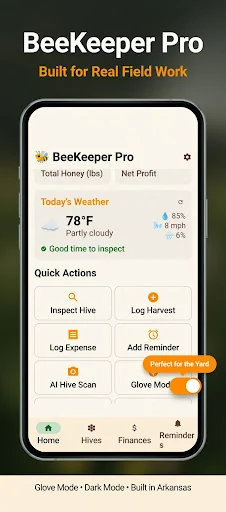
A beekeeping hive inspection log app is most useful when it helps you remember the colony you are about to inspect. BeeKeeper Pro keeps inspection observations, queen records, treatment logs, and harvest information associated with the right hive, giving you a dated history to review on your phone.
For a backyard beekeeper with a few colonies or a growing small apiary, the aim is straightforward: record what you observed, find it again, and make the next visit easier to prepare for. Here is a practical way to build that habit with BeeKeeper Pro: Hive Manager on Android.
Give each hive a name you can recognize in the yard
Before entering a long set of records, decide how you will identify the hives physically. A digital name is only useful if you know which colony it refers to when you are standing in the apiary.
Create the hive records in the app and use a naming system that matches your own labels or locations. Keep the names consistent through the season. When you look back at an observation, you want to be confident that it belongs to the same hive rather than a similarly named record.
This small setup step makes a hive management app for backyard beekeepers much easier to use during a busy visit.
Record observations while they are still specific
BeeKeeper Pro supports notes about queen status, brood observations, temperament, honey frames, and mite-count information. Use the fields that fit the inspection you actually performed. A short, accurate entry is more useful than a complete-looking form filled from memory later.
Separate what you saw from what you intend to check next time. If an observation was uncertain, record that uncertainty in your notes rather than turning it into a definite conclusion. The app organizes the record; your experience and appropriate beekeeping guidance determine what the observation means.
It can help to choose a small set of observations you record consistently. That makes successive visits easier to compare without forcing every inspection into the same length or level of detail.
Keep seasonal history attached to the colony
Queen, treatment, weight, and swarm records are easier to review when their dates stay connected to the correct hive. BeeKeeper Pro brings those records into the same seasonal history as the inspections.
Use treatment logs to document what was actually done, with the details needed for your own records. Do not rely on a note-taking app to determine whether a treatment is appropriate. Follow the relevant product instructions and qualified local guidance for decisions about colony care.
Optional image-analysis results should also be treated as suggestions to review. The product does not promise that a photo can guarantee a colony's health or replace an experienced inspection.
Add harvests and expenses without losing context
The app also supports harvest information, expenses, and available reports. Recording those details alongside the colony history gives you a more useful seasonal picture than keeping production figures in an unrelated notebook.
Choose a consistent way to record the information you care about. If you change your naming or measurement conventions midway through the year, make that clear in the notes. The point is to make the records understandable when the season is no longer fresh in your memory.
You can then use the available reports to review what you have entered. Reports are only as complete as the observations and events you record, so regular small updates matter more than an occasional large catch-up session.
A simple inspection-day routine
- Review the previous record before you approach the hive.
- Confirm you have selected the correct colony.
- Enter the observations relevant to that visit.
- Record any action actually taken and any follow-up you want to remember.
- Review the entry before moving on to the next hive.
- Check connected features when you have the appropriate signal or setup.
The current product information describes offline core record keeping. Live weather, synchronization, and other connected tools need the relevant connection or configuration. That distinction matters when your apiary is away from reliable service.
Frequently asked questions
Is BeeKeeper Pro only for large operations?
No. The product is aimed at backyard and small-farm beekeepers, including those managing a few colonies or a growing apiary. Start with the records you actually use.
Can it tell me whether a colony is healthy?
It helps organize observations and history. It does not replace an inspection or guarantee a health assessment, including when optional image analysis is used.
Where are the official details and download?
See the BeeKeeper Pro product page and BeeKeeper Pro: Hive Manager on Google Play for current features and purchase terms.
If you also need to bookmark access points or off-site yard locations, explore the separate My Location Saver guide. For the hive's own story, start with one clear inspection record in BeeKeeper Pro and build from there.