
A home inventory app for moving boxes solves a very ordinary problem: you know you own the item, but you cannot remember where it went. Home Inventory: Find My Stuff lets you organize belongings by location, add photos and useful details, and search the records when you need something again.
The Rivets Inventory website and the Home Inventory Android listing refer to this same product, package com.rivets.claims. Whether you are preparing for a move, organizing a garage, or keeping track of a collection, start with a system you can maintain after the first afternoon.
Choose locations that match the real space
A location should mean something when you are standing in the room. “Garage shelving” is more useful than an abstract category if you need to walk over and retrieve a tool. During a move, you might use a room name together with a visible box label so the record and the physical container agree.
Home Inventory lets you create locations and associate items with them. Choose a consistent naming pattern before entering dozens of belongings. If one box is “Kitchen 01” and another is “K-2,” searching later may take more thought than it should.
You do not have to catalog the entire house at once. Begin with the shelf, closet, or collection you most often search.
Photograph what helps you recognize the item
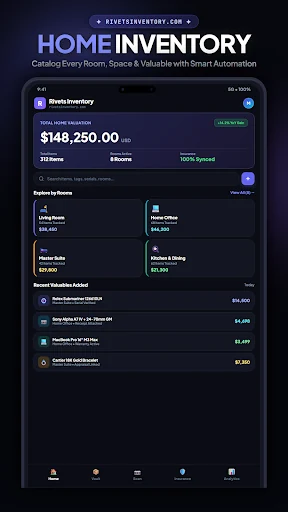
The app supports item photos, quantities, descriptions, and other useful fields. Use them to answer the questions you are likely to have later. A photo can distinguish two similar cables or show which storage container holds the seasonal decorations. A short description can explain an accessory that would otherwise look anonymous.
For a home inventory app with photos and search, consistency is more helpful than filling every field. Record the details that help you identify and locate the item. Add a quantity when it matters, and update the record when the contents change.
If you photograph sensitive documents or valuables, consider what information you want in the record and review your device and backup access settings.
Use tags for a second way to find things
Locations answer “where is it?” Tags can answer a different question, such as “what belongs to this project?” or “which items are seasonal?” Home Inventory includes custom tags and search, along with available barcode or QR scanning tools.
For example, an item can belong in a garage location while also carrying a tag for a camping kit. That lets you search across physical areas without pretending that everything in the kit lives in one box.
Keep your tags short and consistent. A handful of useful terms is easier to maintain than a new spelling for every entry.
Make the inventory useful during a move
Before packing, create the locations or labels you will use. As you pack, add the items you are most likely to need early, then associate them with the right box or room. After the move, update the locations as you unpack.
- Label the physical container clearly.
- Match the label in the inventory record.
- Add a photo if it helps distinguish the item or container.
- Search for one packed item before sealing the whole batch.
- Update the location when the item moves permanently.
This workflow turns a moving-box inventory on Android into something you can test immediately. If the search points you to the right container, the system is doing useful work.
Keep a separate copy of the records
The product includes available spreadsheet export and backup options. Review those before you depend on a single device as your only inventory record. The current listing describes offline inventory use, while Google Drive backups and other connected services require the appropriate connection and account setup.
Some advanced tools, including NFC scanning, saved advanced searches, and removal of the per-item photo limit, may require paid access. Check the current Google Play listing for the features and price available to you.
Frequently asked questions
Is this only for moving?
No. Households, collectors, rental owners, and small operations can use it to organize stored belongings. Moving is simply a situation where clear locations and photos become especially useful.
Is Rivets Inventory a different download?
The official Home Inventory product page links to Home Inventory: Find My Stuff. The Rivets Inventory website supports that same Android product.
Can it help me remember places outside the house?
For saved map locations, use the separate My Location Saver guide. Home Inventory organizes belongings; My Location Saver bookmarks places.
Download Home Inventory: Find My Stuff and begin with one shelf or one box. Build a record you can find and maintain before expanding it to the rest of the house.