
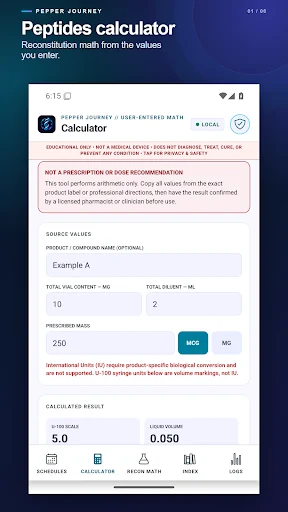
A peptide calculator and vial tracking app brings two different tasks into one place: working with user-supplied calculation inputs and keeping a record of information you want to review later. Peptide Calc & Reconstitution includes educational calculation references, vial records, calendar entries, personal logs, and available reports.
This is a software guide for adults. It does not recommend a compound, dose, treatment, injection method, or routine. The app is not a medical device and does not decide whether an input or a substance is appropriate for someone. Health decisions and questions about prescriptions belong with a qualified clinician or pharmacist.
Understand what a calculator can and cannot decide
A calculator works from the values entered into it. A result does not confirm that the starting values, units, product information, or intended use were correct. That distinction is important when reviewing any educational reconstitution calculator app.
Peptide Calc's tools are user-directed. Read the app's educational-use information and check the labels and units in the interface before entering data. If something is unclear or conflicts with professional instructions, do not treat a calculated number as a way to resolve that uncertainty.
This guide deliberately does not provide worked dosing examples. Its purpose is to help you understand the app's organization and record tools, not turn a product article into a treatment protocol.
Keep source information with the record
When you create a personal record, use clear names and dates so it is understandable later. Avoid an abbreviation that only makes sense in the moment. If a value was entered incorrectly, correct the record rather than allowing a tidy-looking history to preserve an error.
The product includes vial information, dates, inventory, calendar entries, and personal logs. Those fields can help keep information together instead of spreading it across screenshots and separate notes. They do not independently verify a product's identity, contents, quality, or suitability.
For an adult personal record keeping app, clarity is the benefit. A complete-looking entry should not be mistaken for a professional assessment of the information it contains.
Separate calculations from personal observations
The app also describes wellness and nutrition entries and other personal tracking tools. Treat an observation as something you recorded, not as proof that a particular substance or routine caused it.
A dated history may help you remember what you wanted to discuss with a professional. It does not establish a diagnosis or demonstrate that a change was safe or effective. Keep that distinction clear when reviewing trends or summaries.
If you choose to use several record tools, give each one a consistent purpose. That makes it easier to understand which entries contain supplied product information, which contain calculations, and which describe your own observations.
Use reports to review your own entries
Available summaries and PDF reports provide another way to look at the information you have recorded. Review the content before you save or share a report, especially if it includes personal health-related notes.
Check names, dates, units, and whether the record is complete enough to make sense outside the app. A report organizes the entries; it does not turn them into verified medical evidence. Share personal information only with the people and through the methods you intend.
Review the current app privacy information before deciding what to store. Device access, backups, and any connected features deserve attention when the information is personal.
A careful way to explore the software
- Read the current educational-use guidance and product information.
- Identify the record or reference tool you want to understand.
- Check the field labels and units before entering information.
- Keep uncertain values out of a calculation until they are clarified appropriately.
- Review any saved record or report for accuracy and privacy.
This approach helps you evaluate the interface without treating the app as a source of prescribing decisions. You do not need to adopt every available tracking feature to use a record tool consistently.
Frequently asked questions
Does Peptide Calc tell me what amount to use?
No. It describes educational, user-directed calculations and record keeping. It does not prescribe an amount, diagnose a condition, or recommend treatment.
Is PepperJourney the official website?
PepperJourney is the website linked from the Android product. The Peptide Calc product page identifies that connection and the official Google Play listing.
Can I keep a history for later review?
The current product information describes vial records, calendar and site logs, wellness and nutrition entries, and reports. Check the listing for the current tools, privacy details, and purchase terms.
If this kind of educational reference and personal record workflow fits your needs, view Peptide Calc & Reconstitution on Google Play. Review the product information first, and keep all health decisions with the appropriate qualified professional.