 ClipMyKid
For sports parents · Windows & Mac
Turn the whole game into your kid's highlight reel.
Open the game video, tag your kid once, and ClipMyKid finds every play they're in, by jersey number and team color, then cuts a reel ready for TikTok, Instagram Reels and YouTube Shorts. No scrubbing through an hour of footage.
Free download, every feature included. Videos carry a small watermark until you unlock. Intel Mac? Get the Intel version.
cut automatically
What is ClipMyKid?
A highlight editor that already knows which kid is yours.
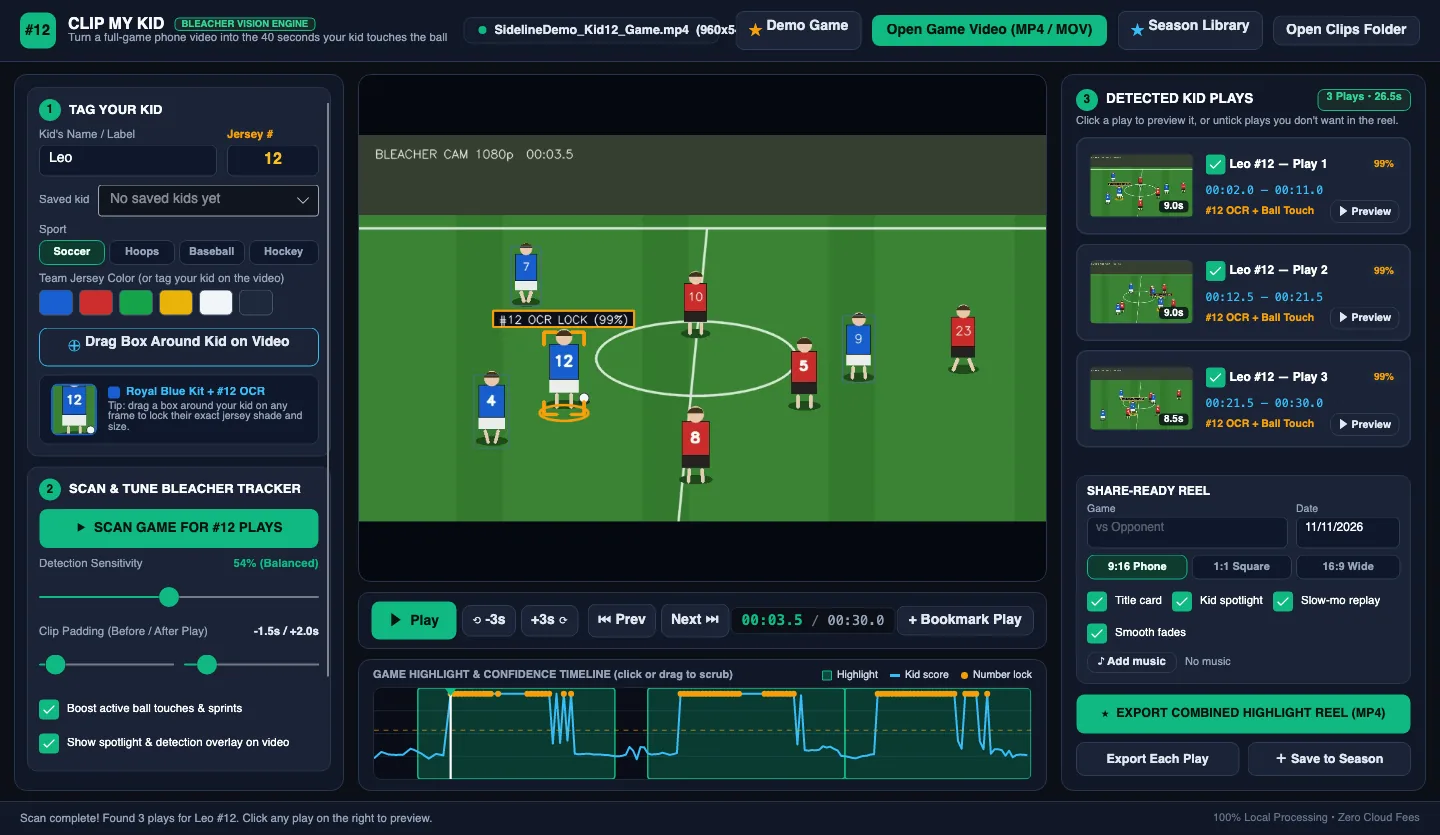
ClipMyKid is a desktop app for Windows and Mac that turns a full game video into your child's highlight reel. You tell it your kid's name, jersey number and team color. It scans the game, keeps the moments your kid is involved in, and exports a polished vertical reel with your kid spotlighted. It's built for the parent with a phone full of hour-long games and no time to edit them.
How it works
Three steps, about ten minutes.
Open the game video
Any MP4 or MOV from your phone or camera. Drag it in, or open it from the folder. Long games and games split into several videos both work.
Tag your kid
Type their name and jersey number, tap the team color, and drag a box around your kid on one clear frame. Save them once and reuse them all season.
Scan & export
Click Scan Game. Every play your kid is in shows up with a thumbnail. Untick the misses, pick 9:16, 1:1 or 16:9, and export.
Share-ready reels
Reels people actually watch to the end.
Raw clips of a tiny kid in a wide shot don't get watched. ClipMyKid follows your kid in a vertical frame, points them out, and replays the big moment.

A title card in team colors
Name, number, opponent and date open the reel, and an end card closes it. Add your own music if you like.
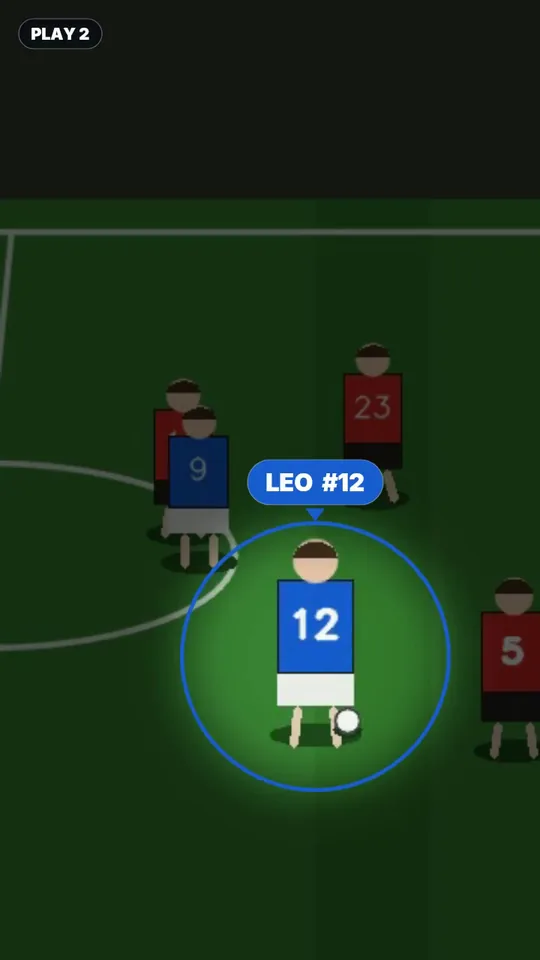
Kid spotlight
Each play opens with a ring and name tag on your kid, so grandparents know exactly who to watch.

Slow-mo replay
The best moment of every play replays in slow motion, zoomed in, with a follow-cam that keeps your kid centered.
Season Library
A whole season, one reel.
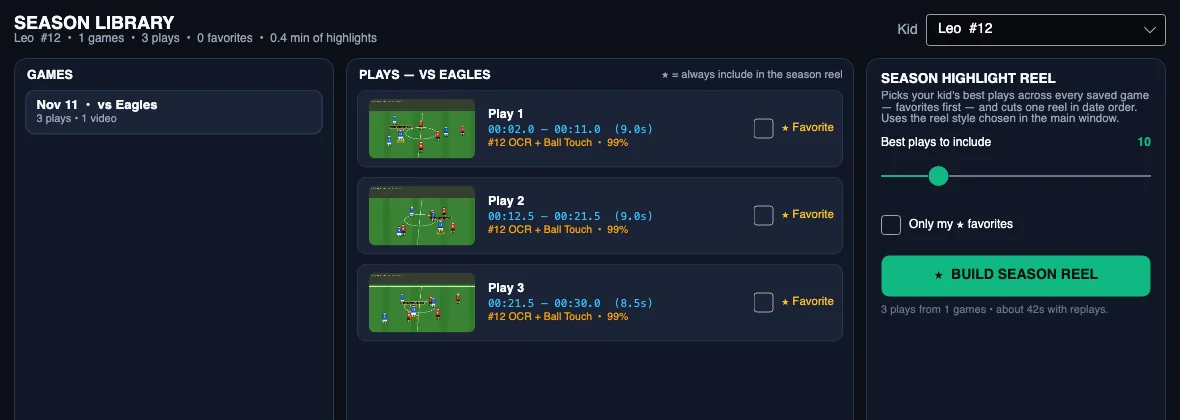
Save each game with its plays. Star the ones you love. At the end of the season, ClipMyKid pulls the best plays from every game into one season reel, in the order they happened.
- Every game, every play, with thumbnails
- Favorites always make the season reel
- Multiple kids, each with their saved number and kit
- Great for end-of-season parties and recruiting videos
Everything included
Built for game day, not for video editors.
Reads jersey numbers
Uses the text recognition built into your computer (Windows OCR or Apple Vision) to confirm it's really your kid's number.
Tracks between reads
When the number turns away, kit color, appearance and position keep the track going through the play.
Sport presets
Soccer, basketball, baseball and hockey set how much of the lead-up and follow-through each play keeps.
Any format
Vertical 9:16, square 1:1 or wide 16:9 MP4. One combined reel, or each play as its own clip.
Private by design
No uploads, no cloud, no account. Your kids' videos stay on your computer, and it works offline at the field.
You stay in charge
Tune sensitivity, untick misses, or bookmark a play the scan didn't catch. Changes apply instantly, no re-scan.
Works best when…
- You film from the stands or sideline and your kid is at least a thumb-width tall on screen.
- Their number faces the camera now and then (front or back both count).
- You tag your kid on a clear frame where they're standing apart from teammates.
Very wide, TV-style shots where players are tiny find fewer plays. You can always add one with Bookmark Play.
Pricing
Try everything free. Unlock when you love it.
Every plan includes every feature, Windows and Mac, on up to 3 computers. Paying removes the watermark.
Free
- Every feature
- Unlimited games
- Small "Made with ClipMyKid" mark on exports
Yearly
- No watermark
- 3 computers
- Every sport, every kid
- Cancel anytime
Lifetime
- No watermark, forever
- 3 computers
- One payment, no renewals
Secure checkout by Stripe. Your license key appears right after checkout. Enter it in ClipMyKid under Unlock.
FAQ
Questions parents ask.
How does ClipMyKid find my kid in the video?
You tell it your kid's jersey number and team color and draw a box around them on one clear frame. ClipMyKid then scans the whole game and combines three signals on every frame: the jersey number (read with your computer's own text recognition, Windows OCR or Apple Vision), how closely the player matches the kit and look you tagged, and where your kid was a moment earlier. Plays where your kid is active become clips.
Does ClipMyKid upload my videos?
No. Scanning and editing happen entirely on your Windows PC or Mac. Videos are never uploaded and no account is needed. The app only goes online to check a license key.
What kind of video works best?
Phone or camera video filmed from the stands or the sideline, where your kid is roughly a thumb-width tall on screen and the jersey number is visible some of the time. Very wide TV-style shots where players are tiny and the kit matches the grass give fewer plays, and you can always add a play yourself with Bookmark Play.
Which sports does ClipMyKid support?
Soccer, basketball, baseball and hockey have presets that set how much time to keep before and after each play. Any sport with numbered jerseys works, including football, lacrosse and volleyball.
Is ClipMyKid free?
The download is free and every feature works. Videos exported from the free version carry a small "Made with ClipMyKid" mark. A license removes it: $5 a month, $29 a year, or $59 once for lifetime use.
How many computers can I use one license on?
Three, in any mix of Windows PCs and Macs. You can move a license by choosing Deactivate This Computer in the app.
Can I cancel a monthly or yearly plan?
Yes, anytime. Your plan stays active until the end of the period you paid for, then exports get the watermark again.
What video formats can ClipMyKid export?
MP4 (H.264) in vertical 9:16 for TikTok, Instagram Reels and YouTube Shorts, square 1:1, or wide 16:9. You can export one combined highlight reel or each play as its own clip.
Can it make a highlight reel for the whole season?
Yes. Save each game to the Season Library, star your favorite plays, and ClipMyKid builds a season reel from the best plays across every game, in date order.
What are the system requirements?
Windows 10 or 11 (64-bit), or macOS 13 Ventura or later on Apple Silicon or Intel Macs. 8 GB of memory is recommended for long games.
Windows
Windows 10 or 11, 64-bit. One file, nothing else to install. Download (88 MB)
Mac
macOS 13 or later. Signed and notarized by Apple. Apple Silicon (M1–M4) · Intel
This weekend's game, on everyone's phone by Sunday night.
Download ClipMyKid free, scan your last game, and see your kid's plays in minutes.