Batch Studio

Drop in a folder.
Get back finished work.

Batch Studio is a Mac app with three specialist batch tools in one window: listing photos for real estate, textures and sprite sheets for games, and episodes for podcasts. Each one replaces an afternoon of repeating the same steps.

macOS 14 or later · Apple silicon and Intel · Signed and notarized by Apple · No subscription

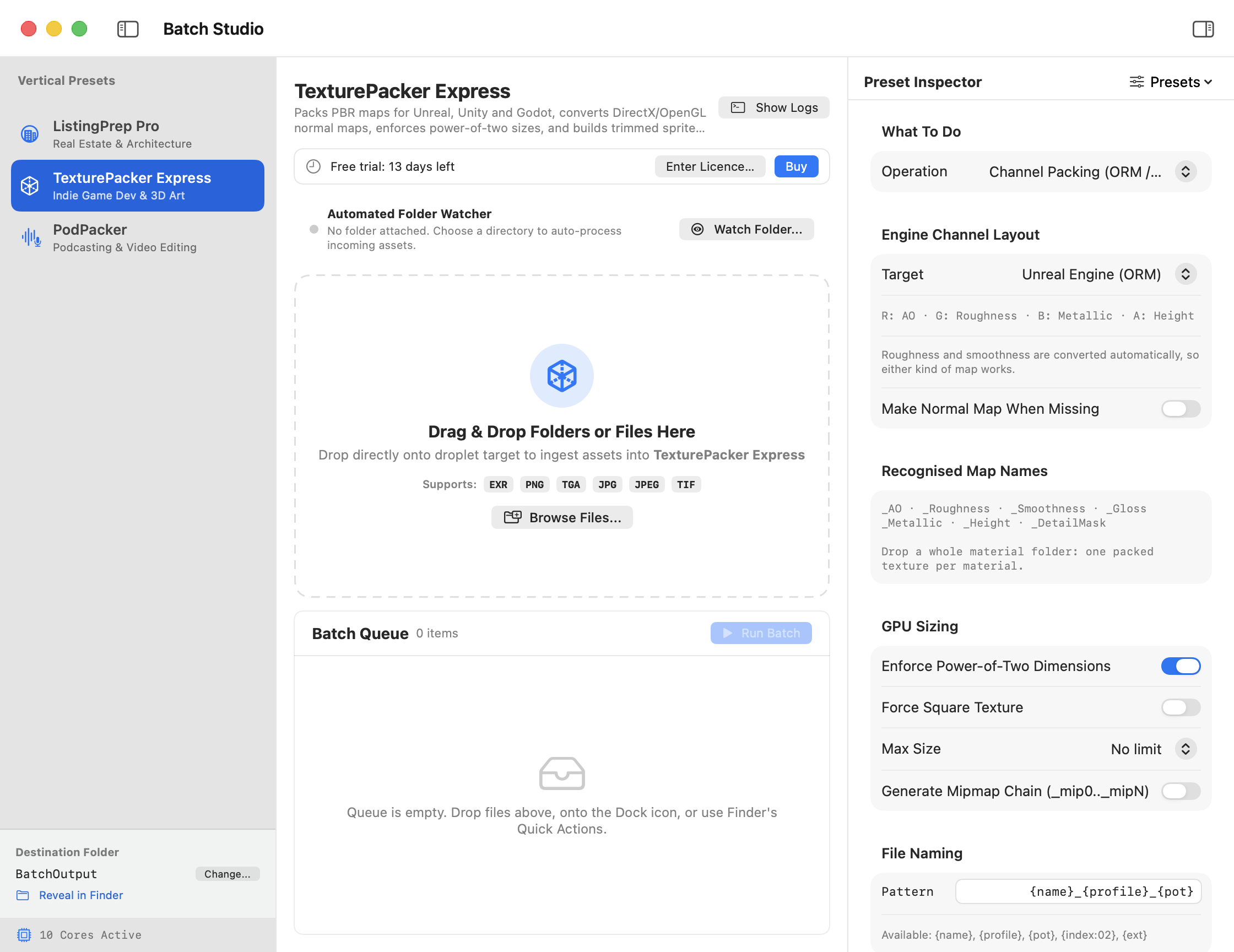
The Batch Studio window: tools on the left, a drop zone and queue in the middle, and the options for the chosen tool on the right

Three tools, each built for one job

Pick a tool, drop files or whole folders, press Run. Settings are remembered, and you can save your own presets for each client or project.

ListingPrep Pro

Listing photos ready for the MLS, Zillow and Airbnb

For real estate photographers and agents who deliver the same set of fixes on every shoot.

  • Merges exposure brackets. The 3 to 7 shots you take of each room at different exposures become one natural-looking photo, with the window view and the interior both visible.
  • Straightens leaning walls and tilted horizons automatically.
  • Removes GPS and private camera data without re-compressing the photo.
  • Sizes for each portal. One-click sets for MLS / Realtor.com, Zillow and Airbnb, or your own size, shape and file-size limit.
  • Adds your watermark and writes a full-resolution print set alongside the web set.
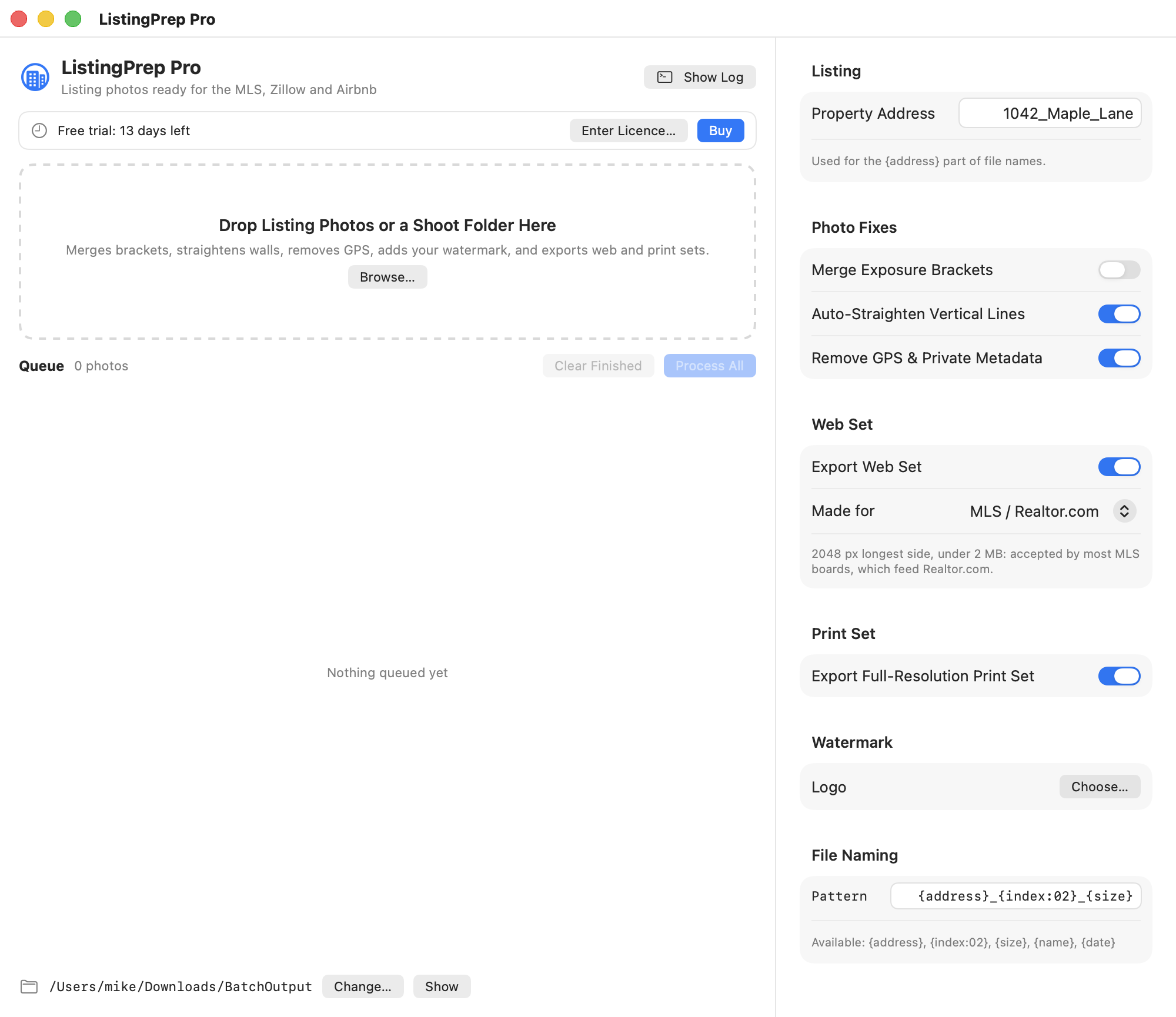
ListingPrep Pro options: merge brackets, straighten, remove GPS, portal presets and watermark
TexturePacker Express

Game textures and sprite sheets, engine-ready

For indie developers and 3D artists moving art between tools and engines.

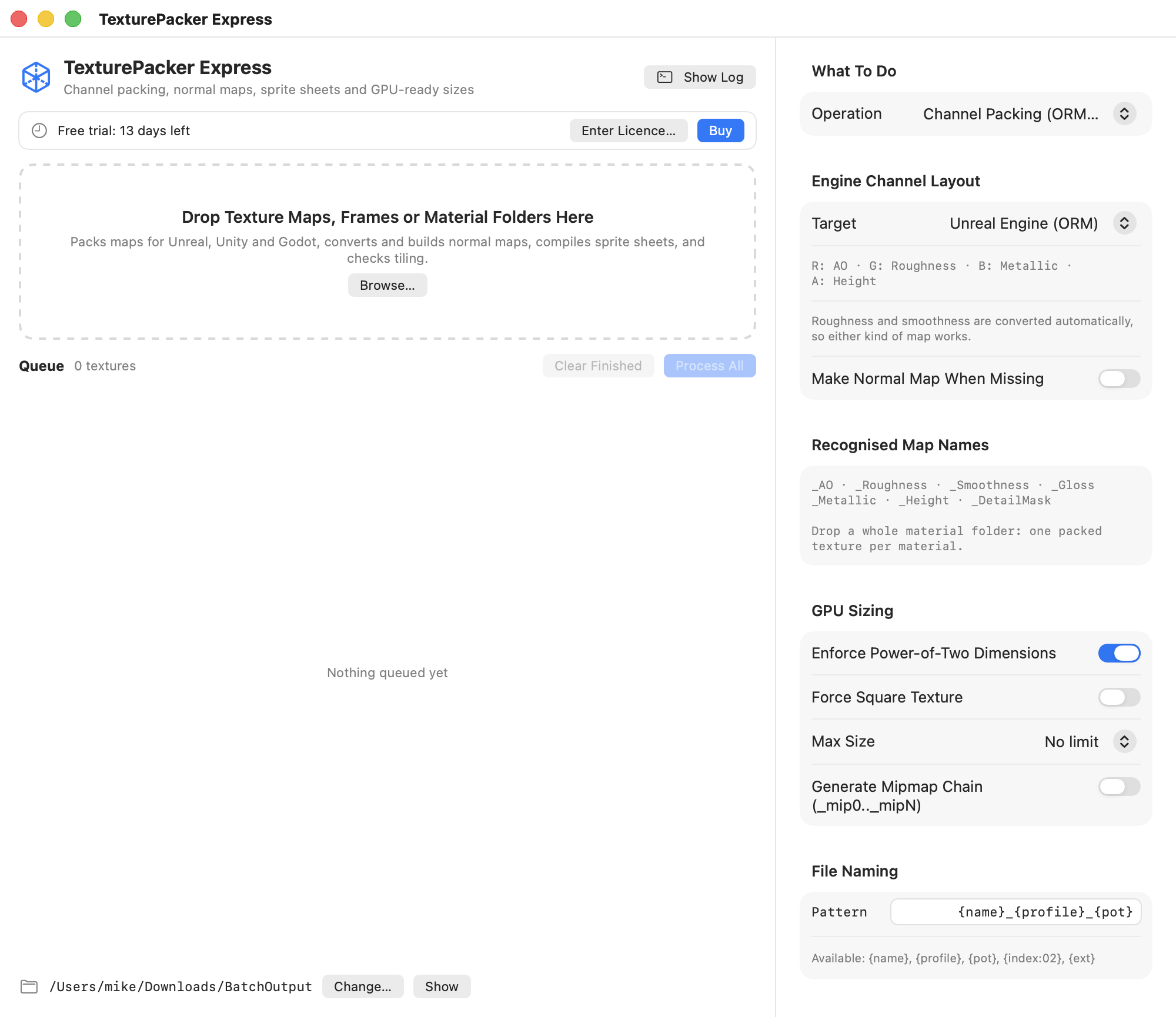
  • Channel packing for Unreal (ORM), glTF and Godot, Unity HDRP mask maps and Unity URP. Drop a material folder; roughness and smoothness maps are converted for you.
  • Normal maps: convert between DirectX and OpenGL, or build one from a height map.
  • Sprite sheets with trimming, padding, edge extrusion, rotation and duplicate-frame reuse. Big sets spill onto extra sheets. Data files for Phaser, PixiJS, Cocos2d, Godot 4 and Unity.
  • Power-of-two sizing, a maximum size for mobile, and mipmap chains.
  • Seamless tiling check that flags textures whose edges don't match and saves a tiled preview of the seam.
TexturePacker Express options: operation, engine channel layout and GPU sizing
PodPacker

From raw recording to a publishable episode

For podcasters and editors who would rather not open four apps per episode.

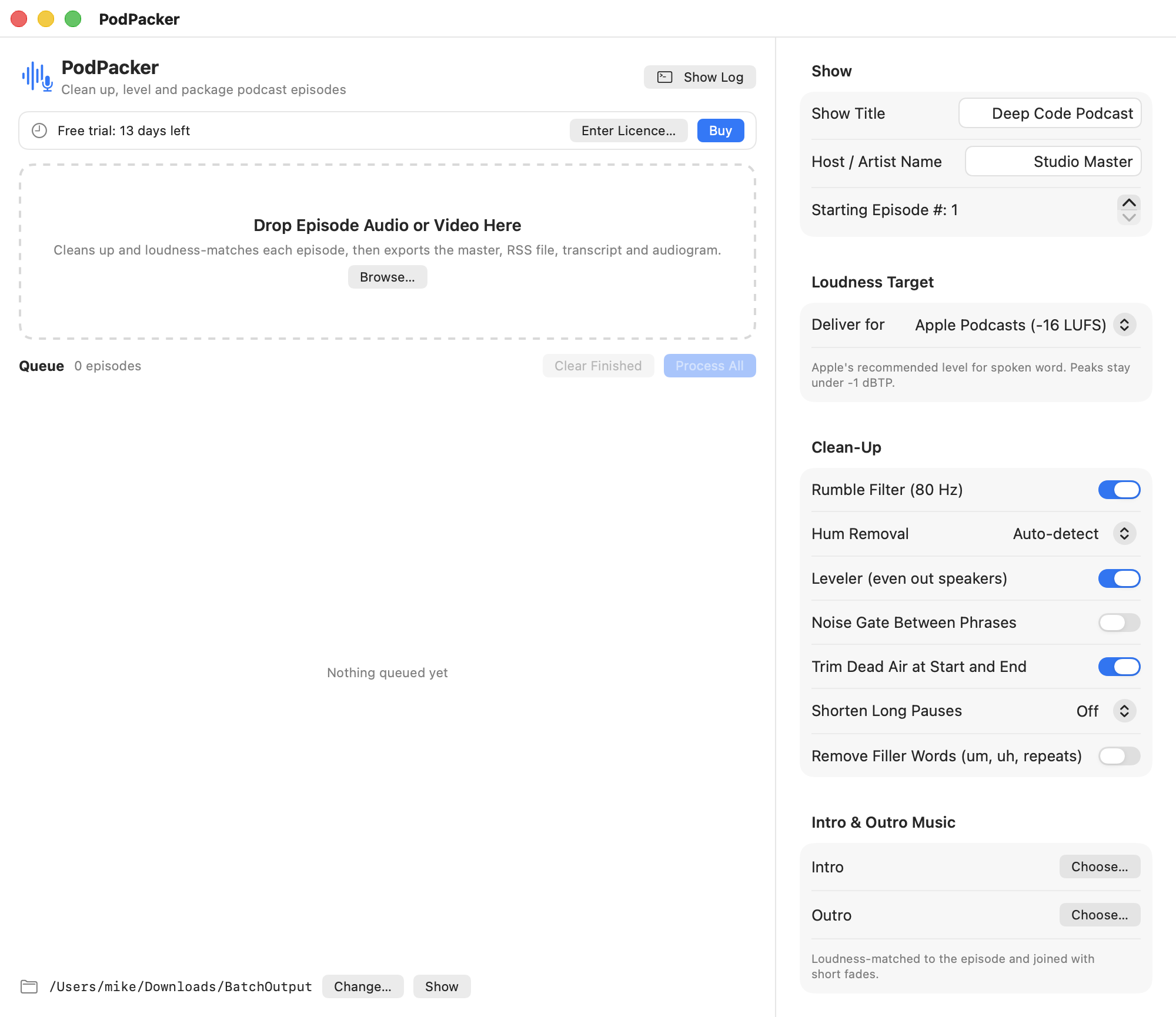
  • Loudness for each platform: Apple Podcasts, Spotify, YouTube, broadcast (EBU R128, ATSC), or Audible / ACX with a pass-or-fail report.
  • Clean-up: rumble filter, mains-hum removal, a leveler that evens out quiet and loud speakers, noise gate, dead-air trimming and long-pause shortening.
  • Filler-word removal. Cuts "um", "uh" and stutters from the audio and the transcript.
  • Transcripts on your Mac as .srt, .vtt and .txt. Your audio is never uploaded.
  • Chapters, intro and outro music, a tagged file for your RSS feed, and a captioned audiogram video cut from the liveliest part of the episode, in square, vertical or wide.

Transcripts, captions and filler-word removal use Apple's on-device speech engine and need macOS 26.

PodPacker options: loudness target, clean-up, intro and outro music

Made for people who do this every week

The parts around the processing matter as much as the processing.

Preview before you run

A dry run lists every file that will be written and warns about name clashes and files that would be replaced.

Watch a folder

Point it at a folder and new files are processed as they arrive, for example from a camera import or a recorder.

Saved presets

Keep a preset per client, show or game, export it as a file, and share it with a teammate.

Finder and Dock

Drop files on the Dock icon, or right-click in Finder and choose "Process with Batch Studio".

Command line

The same pipelines run from Terminal, scripts and scheduled jobs with the included batchstudio tool.

Private by design

Everything runs on your Mac. No account, no uploads. The only network request is a daily check for a newer version.

Buy once. No subscription.

Try everything free for 14 days. After that, the apps keep working on 3 files per batch until you add a licence key.

Batch Studio

$149 one-time

All three tools in one app, plus the folder watcher, saved presets, Finder and Dock extras and the command-line tool. The key also unlocks the three single apps.

Buy Batch Studio

ListingPrep Pro

$49 one-time

The listing-photo tool on its own.

Buy

TexturePacker Express

$49 one-time

The game-texture tool on its own.

Buy

PodPacker

$49 one-time

The podcast tool on its own.

Buy

Secure checkout by Stripe. Your licence key arrives by email. See the refund policy and terms.

Questions

How does the free trial work?

Download the app and use everything for 14 days. No card and no account. When the trial ends the app still opens and still works, limited to 3 files per batch, until you enter a licence key.

How do I activate my licence?

Open the app, choose Licence… from the app menu (next to About), and paste the key from your receipt email. The key is checked on your Mac, so activation works offline.

Batch Studio or a single app?

If you only do one kind of work, the single app has every option for that work. Batch Studio adds the other two tools, the folder watcher, saved presets, Finder and Dock integration and the command-line tool, and its key unlocks the single apps too.

Which Macs does it run on?

macOS 14 (Sonoma) or later, on Apple silicon and Intel. Transcripts, burned-in captions and filler-word removal in PodPacker need macOS 26, because they use Apple's on-device speech engine.

Does anything get uploaded?

No. Photos, textures, audio and transcripts are processed on your Mac. The app contacts rivetssoftware.com once a day only to see whether a newer version exists.

Do I need FFmpeg?

No. Without it PodPacker writes the feed file as AAC (.m4a). If FFmpeg is installed, it writes MP3 instead and embeds chapters in the file.

How do updates work?

The app tells you when a new version is available and opens the download. Drag the new app into Applications to replace the old one; your settings and licence stay.

How do I install it?

Open the downloaded .zip, then drag the app into your Applications folder. It is signed and notarized by Apple, so it opens without security warnings.