
A rain sounds app with sleep timer gives you control over both the sound and the end of the session. Rain Serenity lets you choose rain, blend in thunder or ambient music, adjust the layers separately, and save a mix you want to return to.
The Android product is Rain Serenity: Rain Sounds. Hushlore is the website linked from that same listing, not a second Android app you need to install. If you want a personal background sound for reading, winding down, or a focused stretch of work, here is a simple way to set it up.
Start with the rain itself
Choose a rain recording from the available library and listen to it on its own before adding another layer. This makes it easier to decide whether the texture fits the room and the activity. A sound you like while reading may not be the same mix you want at the end of the evening.
Keep the listening volume comfortable. The aim is a background you enjoy, not a sound that demands constant attention. If you are using headphones, check the volume there rather than assuming the speaker setting will feel the same.
Rain Serenity is an ambience app. Personal preference matters, and there is no need to find a supposedly perfect mix that works for everyone.
Blend thunder and music deliberately
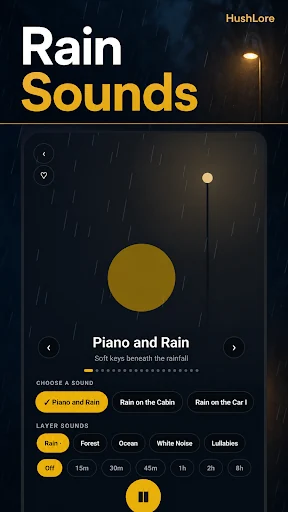
The separate volume controls let you shape the sound rather than accept one fixed recording. Add thunder or ambient music only if it improves the mix for your current setting. Change one layer at a time so you can hear what the adjustment does.
For a customizable rain and thunder sounds app, this is the useful part of the workflow: the balance belongs to you. You might prefer mostly rain while reading and a different balance for a quiet evening. Save each composition with a name that describes when you like to use it.
Once a mix works, leave it alone for a while. Constantly adjusting the sound can become more distracting than the task you meant to accompany.
Save a favorite instead of rebuilding it
Rain Serenity supports saved compositions and playlist options. Use them to return to a mix without remembering the position of every volume control. A short name such as “Reading rain” can be easier to recognize than a description of the individual settings.
Try keeping a small set of favorites rather than dozens of barely different versions. That makes the choice simple when you open the app for a quick session. You can always revise the selection as your preferences change.
This also makes it easier to notice whether a new mix is genuinely useful to you or simply different for a few minutes.
Use the timer for a clear ending
The sleep timer lets playback fade out at the end of the session. Set it when you want the sound to finish automatically rather than continue until you remember to stop it.
That can fit an evening routine, a reading break, or a planned period of quiet work. The timer is a playback convenience; it is not a claim that the app treats insomnia, anxiety, or another condition. If you have health concerns about sleep, use appropriate professional guidance rather than relying on an ambience tool.
Background playback is also described in the current product information. Device settings and the current release can affect playback behavior, so try your preferred setup before making it part of a regular routine.
Check your offline setup before you need it
The current Rain Serenity listing describes offline listening. Before a trip or a session away from a reliable connection, open the app and confirm that the recordings and saved mixes you want are available on your device.
The listing also says no account or subscription is required. Check Google Play for the current release and any purchase information, since app details can change over time.
A comfortable first session
- Choose one rain recording.
- Set a comfortable volume in the room or on your headphones.
- Add a small amount of another layer if you want it.
- Save the composition with a recognizable name.
- Set the timer if you want an automatic finish.
- Begin your reading, quiet activity, or evening routine.
The result should be easy to return to. You do not need a complicated audio setup to create a background sound that feels right for your space.
Frequently asked questions
Is Hushlore a separate app?
Hushlore is the website associated with Rain Serenity: Rain Sounds. The Rivets product page identifies the official Android listing.
Can I control the layers independently?
Yes. Rain, thunder, and music have separate controls, and the app supports saving your compositions.
Where do I download it?
Install Rain Serenity on Google Play and start with a single recording. If you enjoy a quiet puzzle alongside your chosen ambience, explore our Word Connect guide as a separate activity.