A simple invoice maker for contractors should help you get a clear bill to a customer without turning the end of the job into another long desk session. Rivets Simple Invoice Maker organizes the customer, work items, quantities, prices, and totals into a professional PDF you can share from your phone.
The Android app is Simple Invoice Maker: Trades. It is designed for straightforward billing by contractors, handymen, cleaners, landscapers, freelancers, and other small businesses. Here is how to build a useful invoice workflow around it.
Gather the details before you build the invoice
The app can arrange the document, but the best starting point is a clear record of the completed work. Check the customer's details, the items you are billing, and the prices that apply to the job.
For example, a handyman visit might involve several separate tasks and materials. A cleaning job might use a different set of line items. Organize the invoice around the way the work was agreed and performed, rather than copying a generic description that leaves the customer guessing.
Make the item names specific enough to recognize later. “Repair work” may mean little a month from now. A concise description of the actual task gives both you and the customer a better record.
Build readable line items
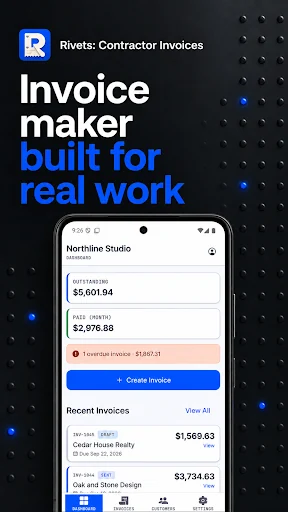
Simple Invoice Maker keeps quantities and prices with the job items. Use that structure to make the total understandable. Review material and labor entries, remove duplicates, and check that each item belongs to this customer and this job.
If you are looking for an invoice app for handymen on Android, the practical test is whether someone can follow the bill without a separate explanation for every line. A readable invoice does not need unnecessary detail, but it should give the customer enough context to understand the charge.
Where tax settings apply, check that they match the settings your business should use. An invoicing app does not decide your tax obligations or replace your accountant's advice.
Check the PDF before sharing it
The app prepares a professional PDF with your business details and invoice total. Take a moment to inspect that finished file before you send it.
- Confirm the customer and business information.
- Read the descriptions for clarity and spelling.
- Check quantities, prices, and totals.
- Review the currency and tax settings you selected.
- Make sure this is the version you want the customer to receive.
A PDF invoice app for tradespeople is most useful when the output is easy to read on the customer's device as well as your own. Sharing options depend on your device and plan, so use the available method that fits your normal customer communication.
Keep billing distinct from the rest of your accounts
Simple Invoice Maker is a dedicated invoicing tool. It is not a promise to replace every accounting, bookkeeping, or reporting task your business has. Keep the records and professional processes you need alongside the invoice workflow.
If you are still pricing proposed work, a construction estimate may be the more appropriate starting point. Our FieldSquire guide for contractors explains a separate estimate-to-quote workflow. Choosing the right document for the stage of the job keeps communication clearer.
Work in the language you need
The current product information describes English, Spanish, French, German, Russian, and Simplified Chinese for app screens and new invoice PDFs. That can help if you prefer to prepare documents in one of those languages.
Changing the app language does not automatically change saved customer information, currency, or tax settings. Review those separately. A translated interface should make your work easier, while the underlying job details still need to be correct.
A useful first invoice
Start with a completed job you know well. Enter the customer, add the relevant items, and compare the total with your own records. Export the PDF and read it from top to bottom. Once you are comfortable with that process, use the same review habit for later jobs.
This is a better test than filling a document with invented items just to see a total. It shows whether the app fits the way you actually bill customers.
Frequently asked questions
Where is the official Android download?
Use Simple Invoice Maker: Trades on Google Play. The package is com.rivets.simpleinvoicemaker.
What does it cost?
Check the official product page, linked website, and Google Play purchase screen for the current free offer, trial, subscription, and local price.
Can I send the invoice from my phone?
Yes. The app supports preparing and sharing the invoice PDF through the options available on your device and plan. Review the finished document first, then send it to the customer through your preferred supported channel.