Ghostshelf app icon For Mac · video editors, photographers, anyone with a drawer of drives

Never plug in three drives to find one file again.

Ghostshelf keeps a searchable ghost of every external drive on your Mac. Unplug the drive and every file on it stays findable: by name, by what's written inside it, or by what it looks like. Search says which drive to grab. Plug it in and the file opens.

Download for Mac See pricing macOS 14 Sonoma or later · Apple silicon · 3 MB download · free for 2 drives, no account
interview 2022 .mov ⌥ space
Blue T7plug it in
A001_C014_interview_marie_wide.mov
2022 Shoot / Day 2 / Cam A · 8.4 GB · Jun 14, 2022 · 14:52
text: "…when she laughs at the second question…"
⏏ plug in
A001_C015_interview_marie_cu.mov
2022 Shoot / Day 2 / Cam A · 6.1 GB · Jun 14, 2022 · 11:08
filename
⏏ plug in
Orange LaCiemounted
interview_marie_call_sheet.pdf
2022 Shoot / Paperwork · 210 KB · Jun 12, 2022
ocr: "…INTERVIEW — Marie D. — 10:30 AM…"
↵ open
On  Blue T7 — plug it in and Ghostshelf opens it for you.
See it

Thirty seconds, with every drive in a drawer.

Real screens from the app. The demo drives hold drone footage, a client archive, family photos and an office NAS.

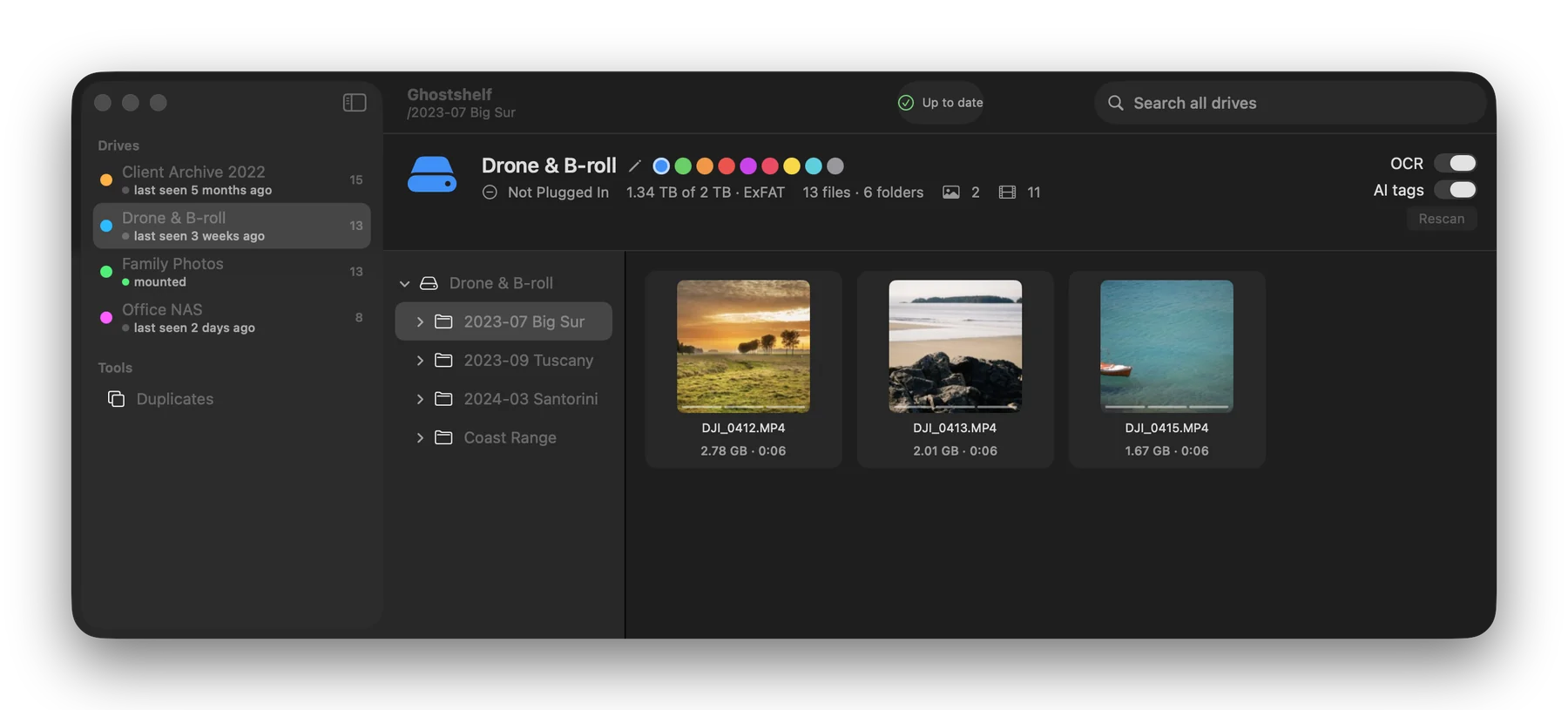
Ghostshelf library window showing an unplugged drone footage drive with video thumbnails, folder tree and drive details
Every drive keeps a ghost. Folders, thumbnails, sizes and dates stay browsable after you eject it.
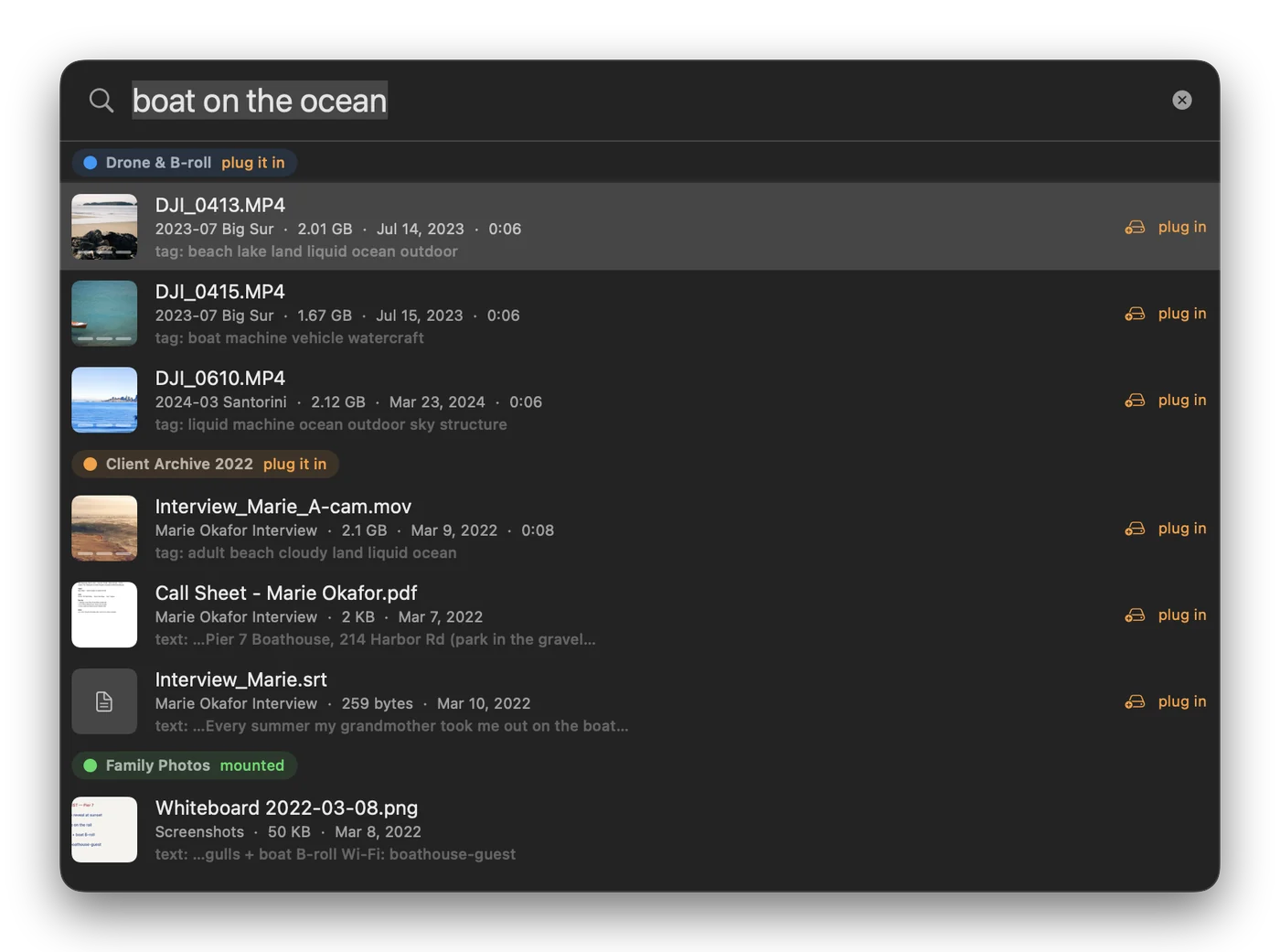
Quick search for 'boat on the ocean' finding drone clips by AI tags and a call sheet by its text
Search by meaning. "boat on the ocean" finds the clip by what's in it, and the call sheet by the words inside.
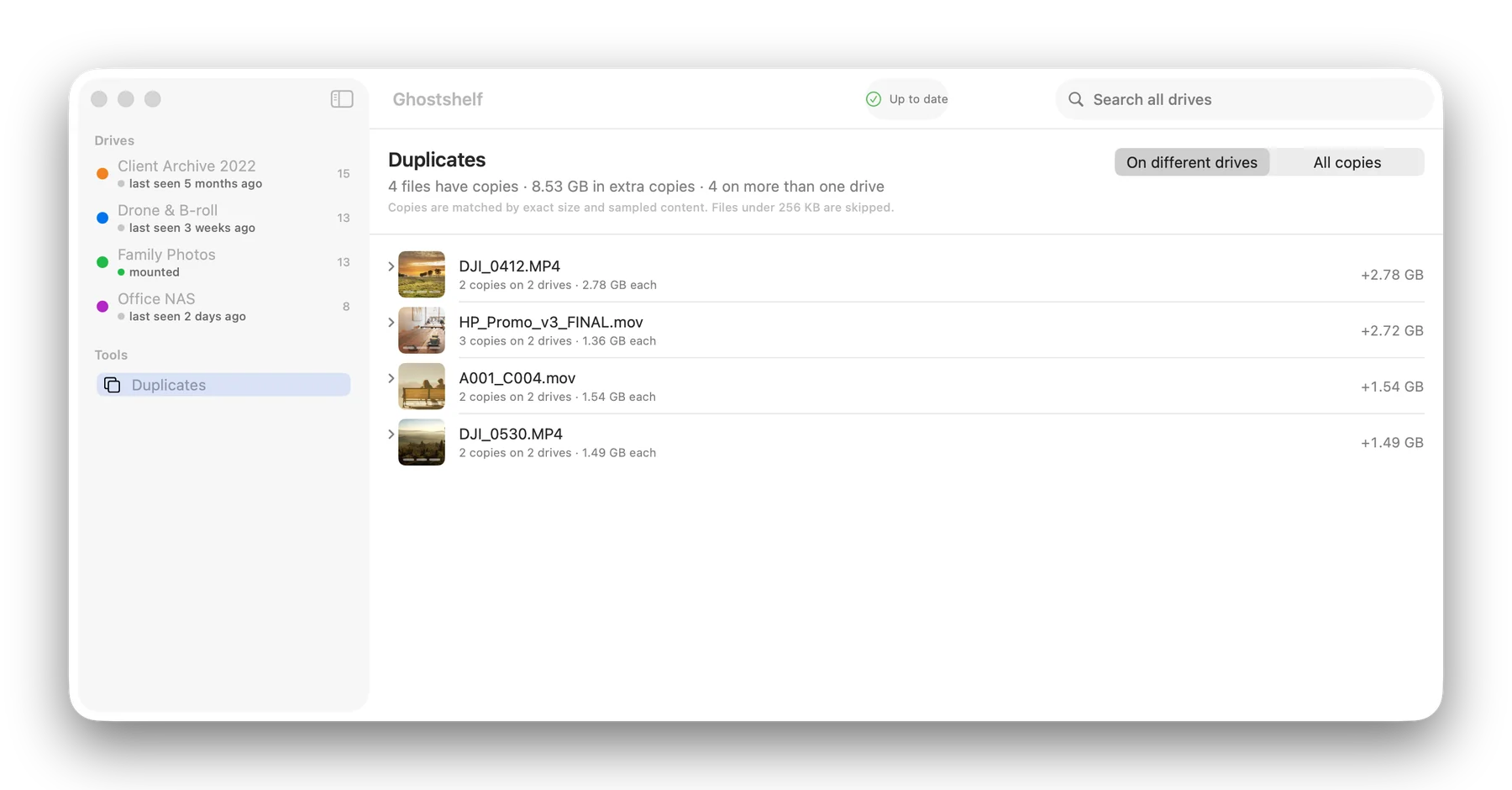
Duplicates page listing files that have copies on more than one drive, with the space they waste
Pro: copies across drives. See what's stored twice, and what only lives on one drive.
How it works

The whole product is four moments.

Everything else is settings.

1 · Plug in

Catalog this drive?

Ghostshelf notices a new volume and asks once. Give it a name and a color. Filenames and folders are searchable within seconds; thumbnails, text and tags fill in over the next minutes while you keep working. Eject early and it resumes next time.

2 · Search

One hotkey, every drive

⌥ Space opens a search bar over whatever you're doing. Results mix all drives, mounted or not, with a thumbnail, path, date, size and a colored drive chip. Type interview 2022 .mov or type the one where she laughs. Both work.

3 · Open, or ask

Plug it in and it opens

If the drive is here, Enter opens the file or reveals it in Finder. If not, the result says which drive to plug in, and the moment that drive appears, the file opens itself.

4 · Browse

What's even on this?

Every drive gets a page: folder tree, grid of thumbnails, size, file counts, last seen. Useful before you wipe a drive or lend one to a client.

What it finds

Six ways to search a drive that isn't plugged in.

All of it runs on your Mac's own chip. No cloud, no account, no model downloads unless you ask for the visual one.

Names and folders

Instant, with prefix matching and the filters editors reach for: extension, year, drive, size, folder.

interview 2022 .mov large

Thumbnails

Quick Look previews for RAW, ProRes, PSD, PDF, Keynote. Video gets three frames at 10 / 50 / 90 %; hover to scrub them.

320 px · ~25 KB each · per-drive cache

Text inside documents

PDFs, Word files, subtitles, call sheets, transcripts, notes. The words in the file become searchable.

"marie" finds the call sheet

OCR

Screenshots, scanned PDFs, whiteboard photos, receipts. Apple's on-device text recognition, so the text in a picture is searchable too.

invoice 4471 → a photo of it

AI tags

Every image and video frame gets 5 to 15 descriptive tags from an on-device model.

sunset · drone · beach · dog

Visual search

Optional MobileCLIP model: describe what the picture looks like and it finds the frame, even when nothing in the filename matches.

"drone footage sunset hawaii"
The promise

Your files never leave your Mac. Your drives never get touched.

A catalog app that walks every drive you own has to earn trust. These are the rules Ghostshelf is built on, and none of them have a setting.

  • It never writes to the external drive.
    No sidecar files, no hidden folders, nothing a client would ever see.
  • Nothing is uploaded. Ever.
    OCR, tags and search all run on-device. License keys are checked on your Mac, without contacting a server.
  • The index is one SQLite file in your Library folder.
    Back it up, move it, delete it. It's yours.
  • It stays out of your way.
    Indexing runs at low priority, pauses on battery, respects quiet hours, and resumes where it stopped.
Compared

The catalogers you may already own.

They've been around for decades. They search filenames.

Searches byNeoFinderDiskCatalogMakerGhostshelf
Filename & folderYesYesYes
EXIF / metadataYesBasicYes
Text inside PDFs & documents——Yes
OCR of screenshots & scans——Yes
What a picture or clip looks like——Yes
Opens the file when you plug the drive in——Yes
Copies across drives & backup check——Pro
Spotlight-style hotkey——⌥ Space
Price~$40 one-time$39 / $70 App StoreFree · $59 · $119, one-time
Pricing

Buy it once. It never stops working.

No subscription. "Your files never leave your Mac" and a monthly bill don't belong in the same sentence. Your key works offline; the app never phones home. Each paid license covers up to 3 of your Macs and includes 12 months of updates.

Free
$0
  • 2 drives
  • Name & folder search
  • Thumbnails
  • Plug-in prompt & auto-open
Download free
Personal
$59 one-time
  • Unlimited drives
  • Text inside documents & OCR
  • AI tags & visual search
  • Hybrid keyword + meaning search
  • 1 year of updates included
Buy Personal — $59
Pro
$119 one-time
  • Everything in Personal
  • Find copies across every drive, even unplugged ones
  • "Is this drive backed up?" check for each drive
  • Drive health: read errors and S.M.A.R.T. status where macOS can read it
  • Upcoming Pro features included for your first year of updates
Buy Pro — $119 Already have Personal? Upgrade for $60: email [email protected].

Secure checkout by Stripe. Your key is shown after payment and emailed to you. 30-day money-back guarantee. Refund policy · License terms

Update pass · $19/year, optional. After your first year, keep new versions coming without a subscription. Skip it and the app keeps working exactly as it is.
Questions

Things people ask before they buy.

Can I get a refund?
Yes. Within 30 days of buying, for any reason. Reply to your license email or write to [email protected]. Details are in the refund policy.
Is this a backup?
No. Ghostshelf keeps an index and small thumbnails, not copies of your files. If a drive dies, you'll know exactly what was on it, but you won't have the files. Keep backing up.
How much space does the index take?
About 2 GB per 100,000 files, nearly all of it thumbnails. The cache is per-drive with a size cap, and there's a one-click "clear thumbnails, keep index."
What if I reformat or rename a drive?
Renamed drives keep their ghost. A reformatted or cloned drive looks similar but not identical, so Ghostshelf asks once: same drive, or a new one? It remembers your answer.
Does it work with Lightroom, Final Cut or Premiere libraries?
Yes. Libraries and bundles are catalogued as single items so your project files stay intact, and the media folders beside them are indexed normally.
Will the first index make my laptop fans scream?
Names and folders come first and take seconds. The slower passes run at low priority, one or two at a time, and pause on battery by default. You decide when it works hard.
How do I install it?
Unzip, drag Ghostshelf to Applications, open it. The first time, macOS asks to allow access to removable volumes; say yes or no drives can be read. The app lives in the menu bar; press ⌥ Space to search. A license key goes in Settings › License and works offline.
Does it update itself?
Yes. Ghostshelf checks for a new version once a day and installs it when you say so. Updates are signed, so the app only accepts versions that came from us. You can turn the check off in Settings › Updates.
Mac only?
For now. Ghostshelf is a native Mac app and uses Apple's on-device frameworks for previews, OCR and tagging. A Windows version is on the list if enough people ask.