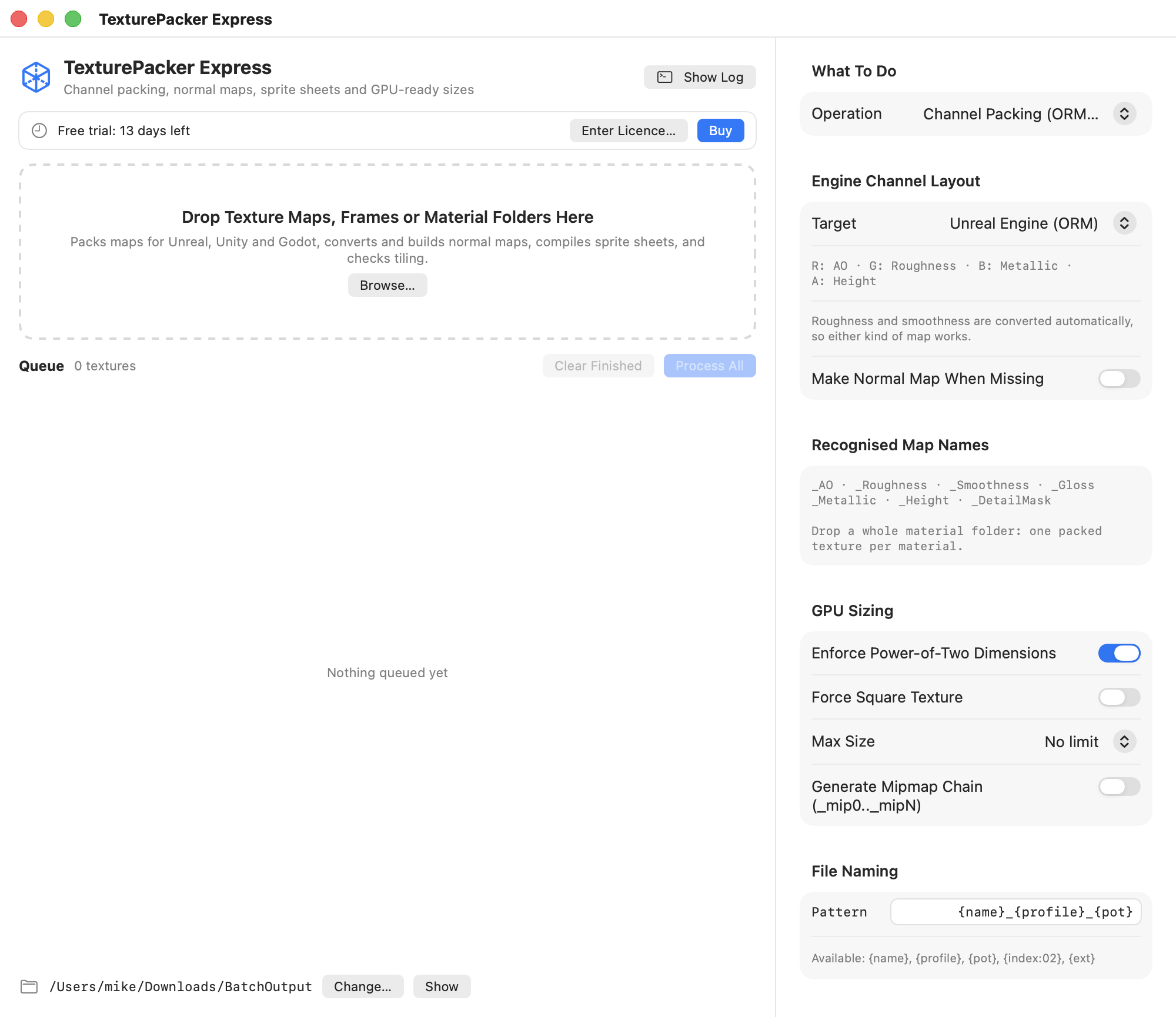
To pack ORM textures, put ambient occlusion in red, roughness in green, and metallic in blue. Export those three grayscale maps as one RGB texture, then check that the importer or shader reads each channel correctly. TexturePacker Express can batch-pack material folders on macOS 14 or later.
What does ORM stand for?
O is ambient occlusion, R is roughness, and M is metallic. In an ORM image they occupy the red, green, and blue channels, respectively. The combined image often looks brightly colored when you open it as a regular photo. View the three channels individually to see whether each still matches its source map.
glTF reads roughness from green and metallic from blue. Its occlusion input reads red. To use one image for all three, point both the material's metallic-roughness texture and its occlusion texture at that image when exporting the glTF material. Confirm how your exporter exposes those inputs. Khronos glTF material specification
Pack one material before you export a folder
Start with a material you recognize, such as painted metal with exposed steel along an edge. Put the ambient occlusion, roughness, and metallic maps for that material together. Check that they have the same dimensions and line up with the same UV layout. If your source app exported a smoothness map, select the appropriate conversion in your packing workflow and verify the result against the intended roughness.
Choose the target channel-packing layout in TexturePacker Express on the Batch Studio page. Export your sample to a separate folder and examine the channels. The blue channel should show the metal where you expect it. The green channel should distinguish the rough paint from the smoother details. Once that example looks right in your engine, use the same layout for the remaining material folders.
How do I import an ORM texture into Unreal?
Open the packed file as a data texture and turn off sRGB for the mask. In a material set up for ORM, wire red to Ambient Occlusion, green to Roughness, and blue to Metallic. Check the actual wiring if you're using an existing shader. Unreal materials can assign different meanings to the channels, so a packed file and its shader need to agree. Epic Games' guide to texture masks in Unreal Engine
View the material under a moving light. If a matte surface turns glossy, inspect the roughness channel and check whether the source was smoothness. If painted areas look metallic, trace the blue channel to its input. Keep your base color and normal maps available so you can isolate the test to the packed masks.
Can I use the same packed file in Unity or for sprite sheets?
Check the requirements of your render pipeline. TexturePacker Express offers distinct layouts for Unity HDRP and URP, as well as Unreal, glTF, and Godot. Save presets with the target name so an Unreal export stays distinct from a Unity export in a shared folder.
A sprite sheet combines separate images into a larger atlas and records where each image belongs. TexturePacker Express also handles that job, with options such as padding and edge extrusion. Keep the atlas image and the matching data file together when you import it. For a method to check the first output and reuse it across the rest of the job, see the Batch Studio batch processing guide.