 Simple Invoice Maker
For contractors and the trades · Windows and Mac
Offline invoice software for contractors. Pay once.
Bring your customers and price list over from QuickBooks, see what you make before you send the estimate, bill every change order, and print a statement or past-due letter when someone is slow to pay. It runs on your own computer with no internet, no account and no monthly bill.
- $49 one-time
- No subscription
- Imports your QuickBooks lists
- Shows your profit
- Change orders
- Past-due letters
- Works offline
- Windows and Mac
Includes one Windows or Mac computer and all 1.x updates.
What is Simple Invoice Maker for Desktop?
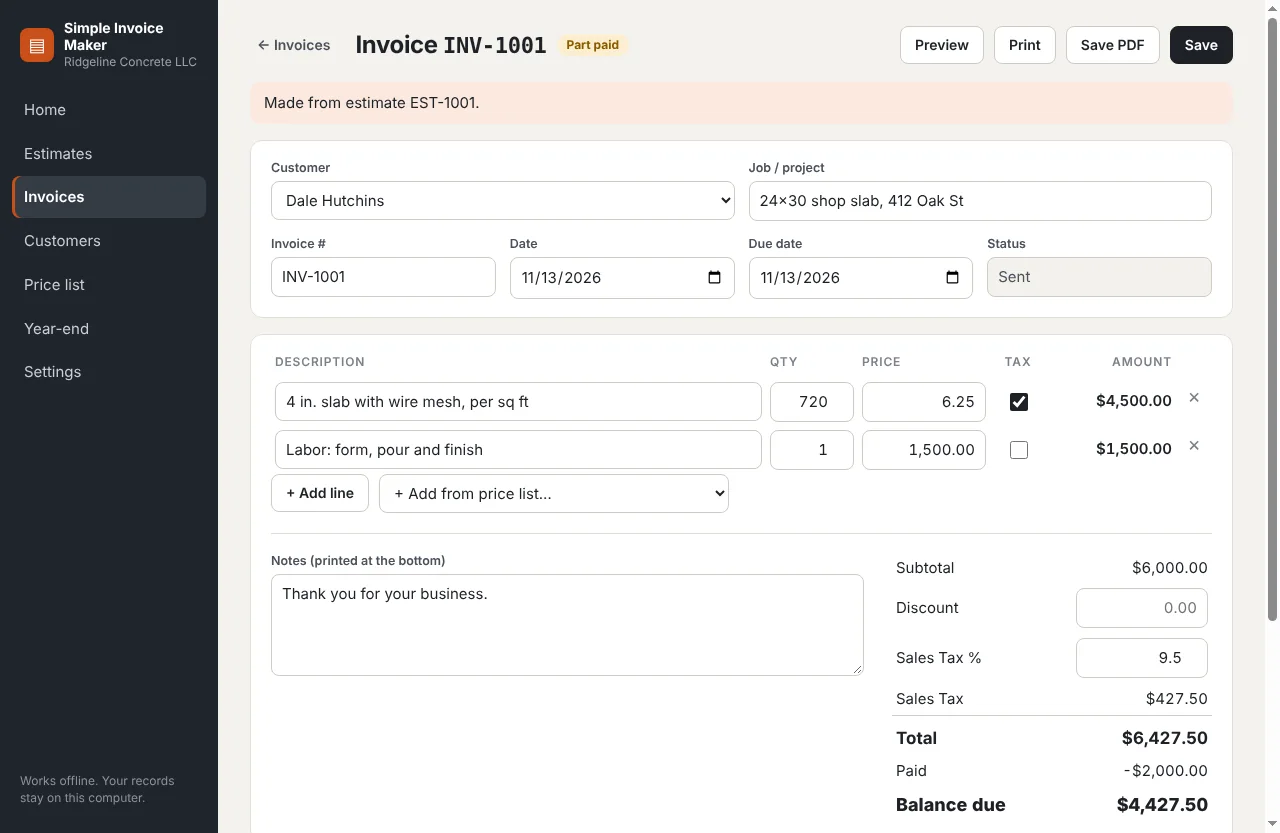
Simple Invoice Maker for Desktop is estimating and invoicing software for contractors that runs offline on Windows and Mac and costs $49 once. It does four things: estimates, invoices, tracking what you have been paid, and a year-end CSV export. Your records stay in one file on your own computer.
It is not accounting software. There is no payroll, no bank feed and no inventory. It is for the contractor who needs clean paperwork and a clear list of who owes what.
- $49, one timeNo monthly or yearly fee.
- No internet neededNo account, no sign-in, nothing uploaded.
- Windows and MacWindows 10 and 11, and macOS 14 or later.
Why this exists
QuickBooks Desktop users are being moved to subscriptions and the cloud.
A lot of contractors only ever used the desktop program for estimates and invoices. That has become harder to keep doing:
What changed
- Intuit stopped selling new QuickBooks Desktop Pro Plus, Premier Plus and Mac Plus subscriptions to new customers after September 30, 2024.
- QuickBooks Desktop is now sold by subscription, not as a one-time purchase.
- QuickBooks Desktop 2023 was discontinued after May 31, 2026. Intuit's service discontinuation policy says discontinued versions lose payroll, payments, online bank feeds, live support and security updates.
What this is instead
- A program you install and own, for $49 once.
- It works with the internet unplugged.
- It does the paperwork a small contractor needs every week, and leaves the full accounting to your bookkeeper or tax preparer.
Know your number before you send it
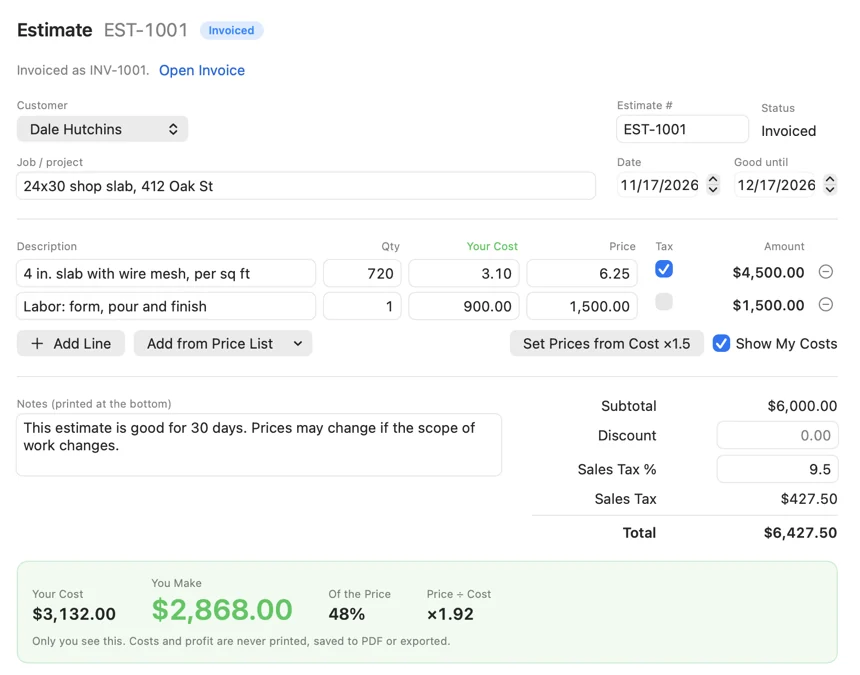
See what you make on every job, while you write the estimate.
Type what each line costs you. The estimate shows your total cost, what you make, and the share of the price you keep. Set your markup once, say ×2, and the price fills in from the cost.
Only you see it
- Costs and profit are never printed, never on the PDF and never in the year-end spreadsheets.
- One click on Show My Costs hides them when a customer is looking at your screen.
No more guessing
- A warning shows when a line has no cost, so the profit is never overstated.
- Losing money on a job shows up in red before the estimate goes out.
Switching from QuickBooks Desktop
Bring your customers and price list over in a couple of minutes.
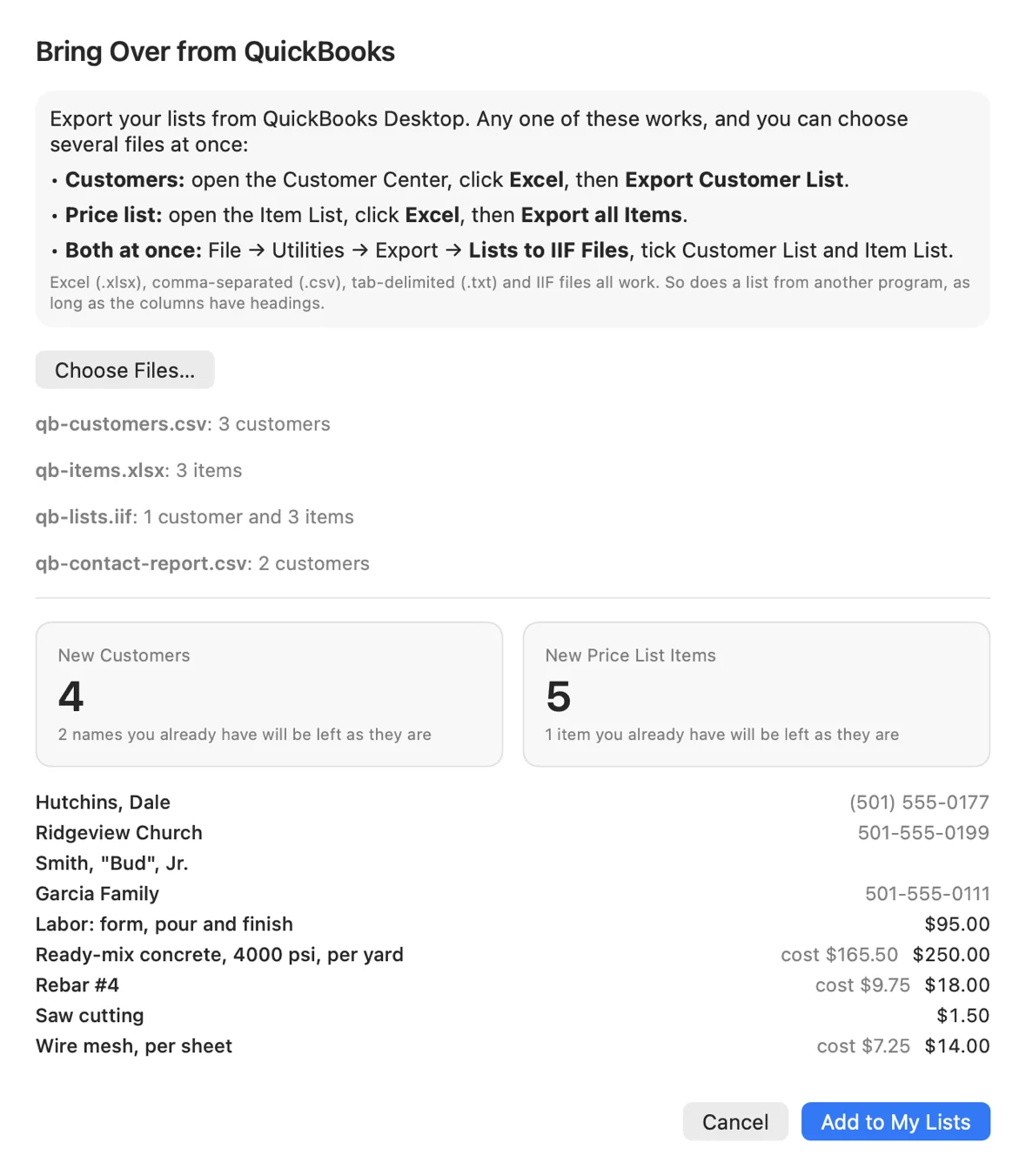
Export your Customer List and Item List from QuickBooks Desktop to Excel or CSV, or both at once as an IIF file, and choose the files. Names, phone numbers, emails, billing addresses, item descriptions, prices, costs and tax settings come over. Jobs, inactive entries and subtotal or discount items are left out, and running it twice never makes duplicates.
Extra work gets paid for
Change orders that go onto the final invoice, so extra work is never left off.
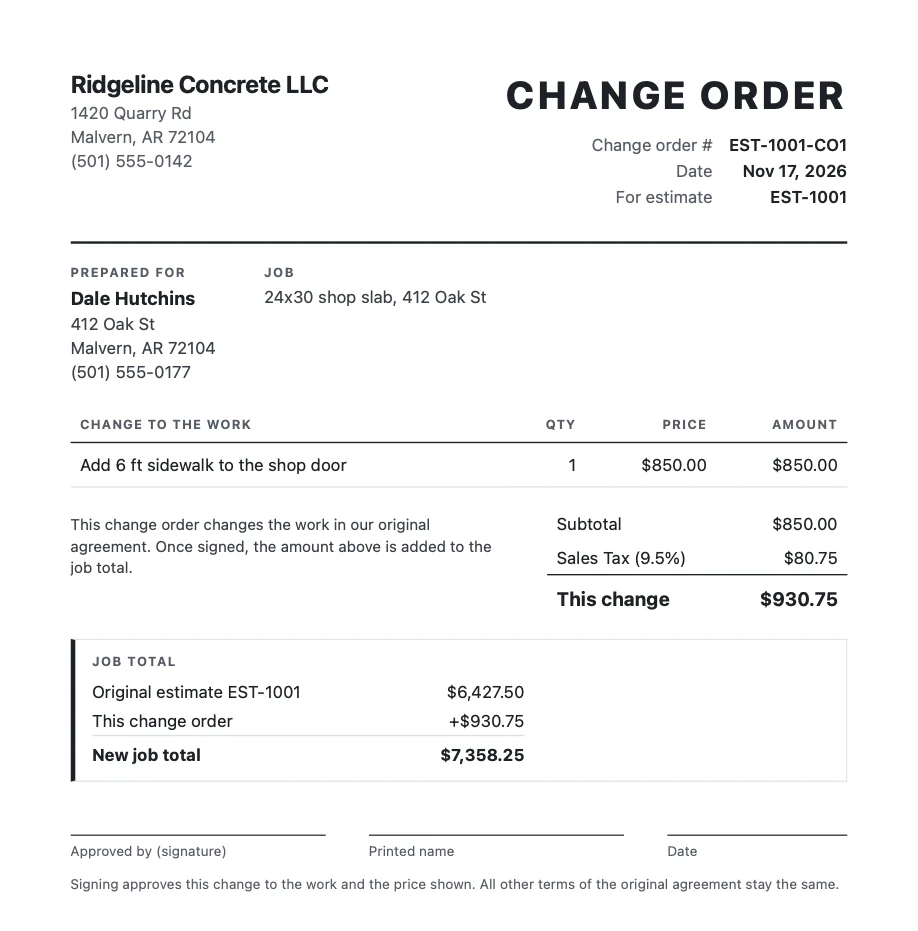
The customer asks for a thicker edge or another 20 feet of sidewalk. Click New Change Order on the job, list the work, and print it for a signature. It shows the original price, this change and the new job total. Once it is approved it rides along onto the invoice, and the home screen warns you about any approved change that has not been billed.
How change orders work
- Each one is numbered from its job, like EST-1001-CO1, and keeps the customer and tax rate.
- Add work or take it out. A credit just goes in as a negative price.
- Approved changes go onto the invoice when you turn the estimate into one, or onto an invoice already sent, or on an invoice of their own.
- The estimate shows the original price, the approved changes and the new job total at a glance.
Get paid
Who owes you, how late they are, and the paper to collect it.
Who Owes Me lists every customer with an unpaid invoice and what they owe by age: current, 1 to 30, 31 to 60, 61 to 90 and over 90 days late. One click prints a statement of everything they owe, or a past-due letter. Pick a friendly reminder, a second notice or a final notice, set the pay-by date, and change any of the wording. The app remembers the last letter and suggests the next one.
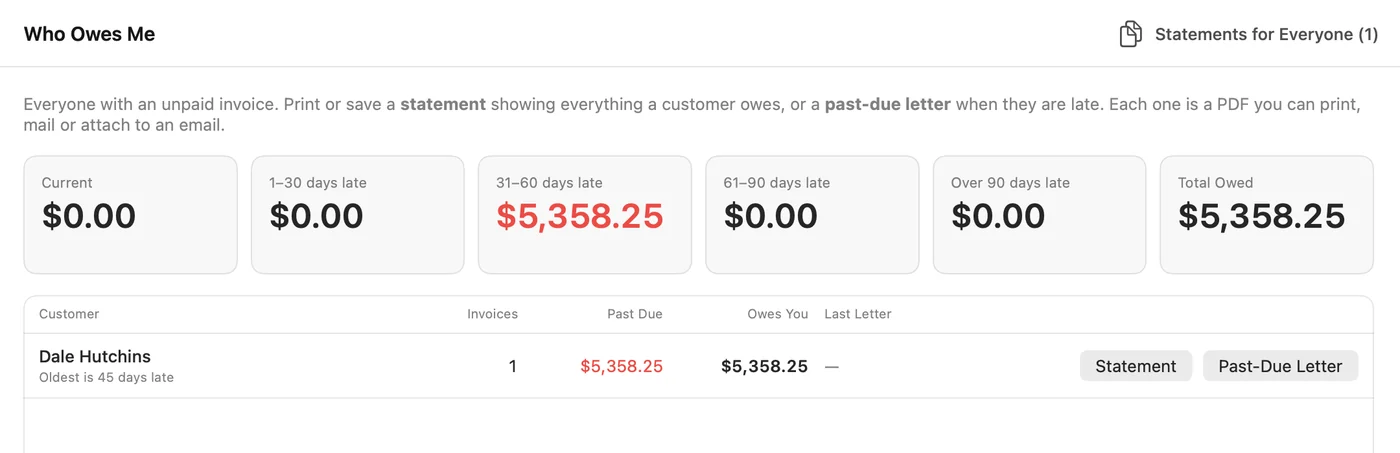
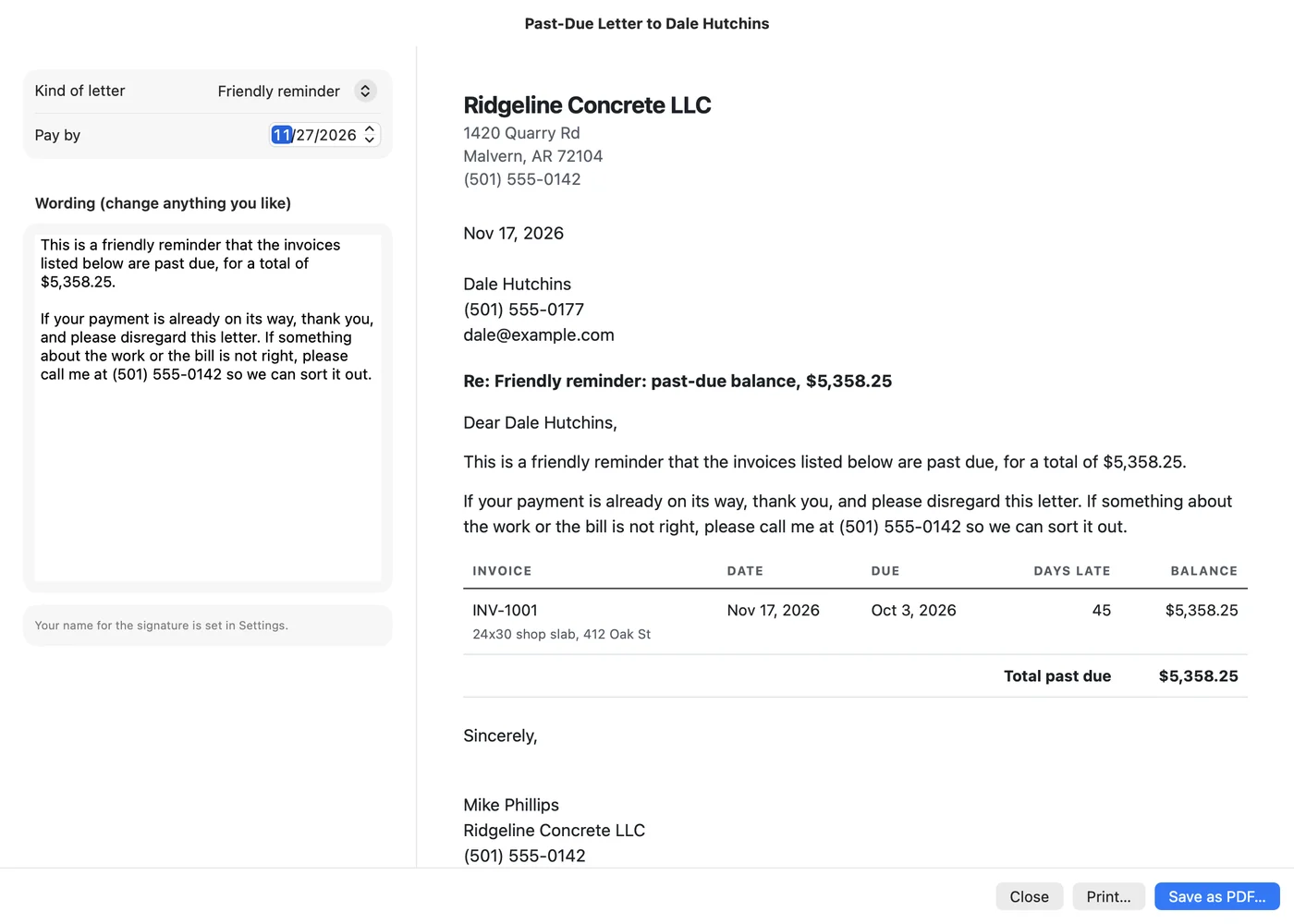
Statements and letters are PDFs you print, mail or attach to an email yourself. Nothing is sent for you and there is no per-letter fee.
How it works
Estimate, invoice, paid, year end.
Four steps, and that is the whole program.
Write the estimate
Pick the customer, type the job, add your lines from your price list or by hand. The total and sales tax add up as you type.
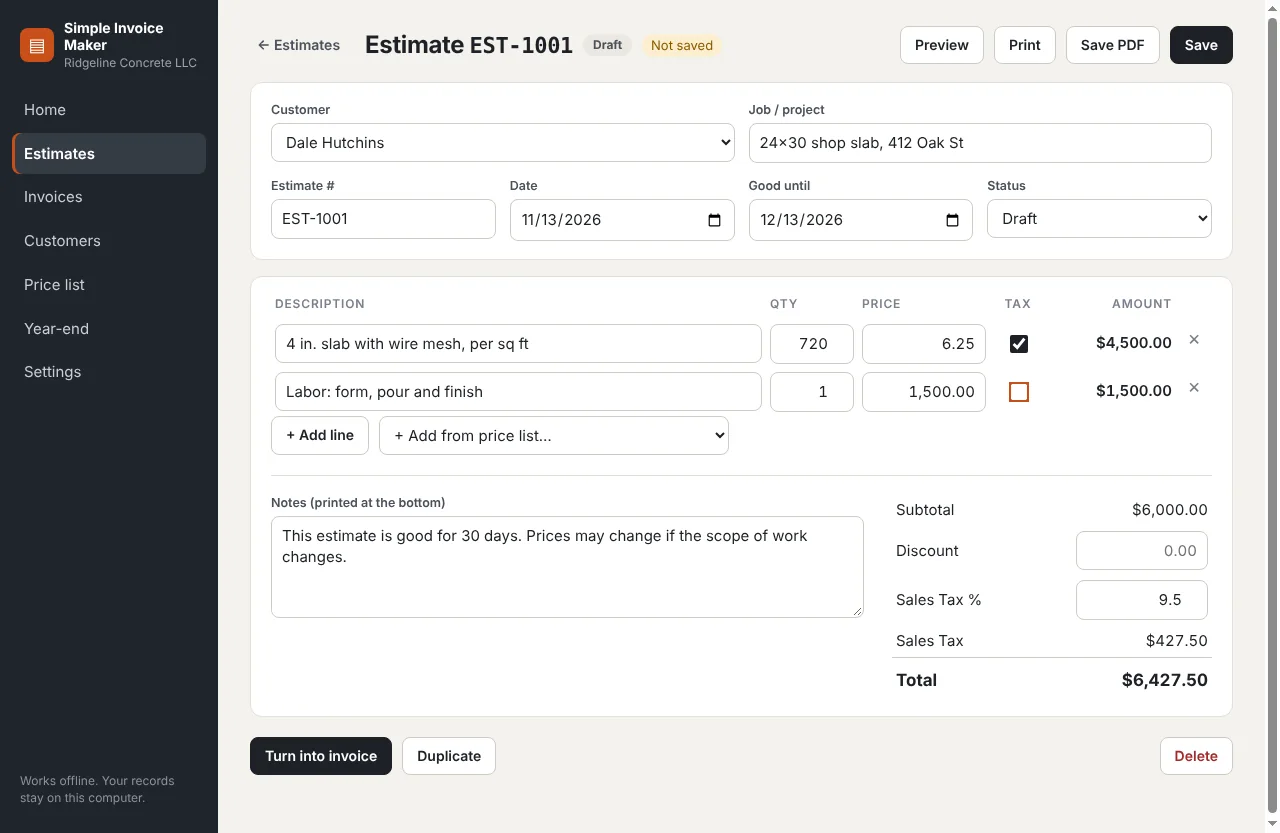
Turn it into an invoice
When the job is a go, one click makes the invoice. Nothing is retyped.
Record what you are paid
Deposits, part payments and the final check, each with its date and check number. Home shows who still owes you and what is past due.
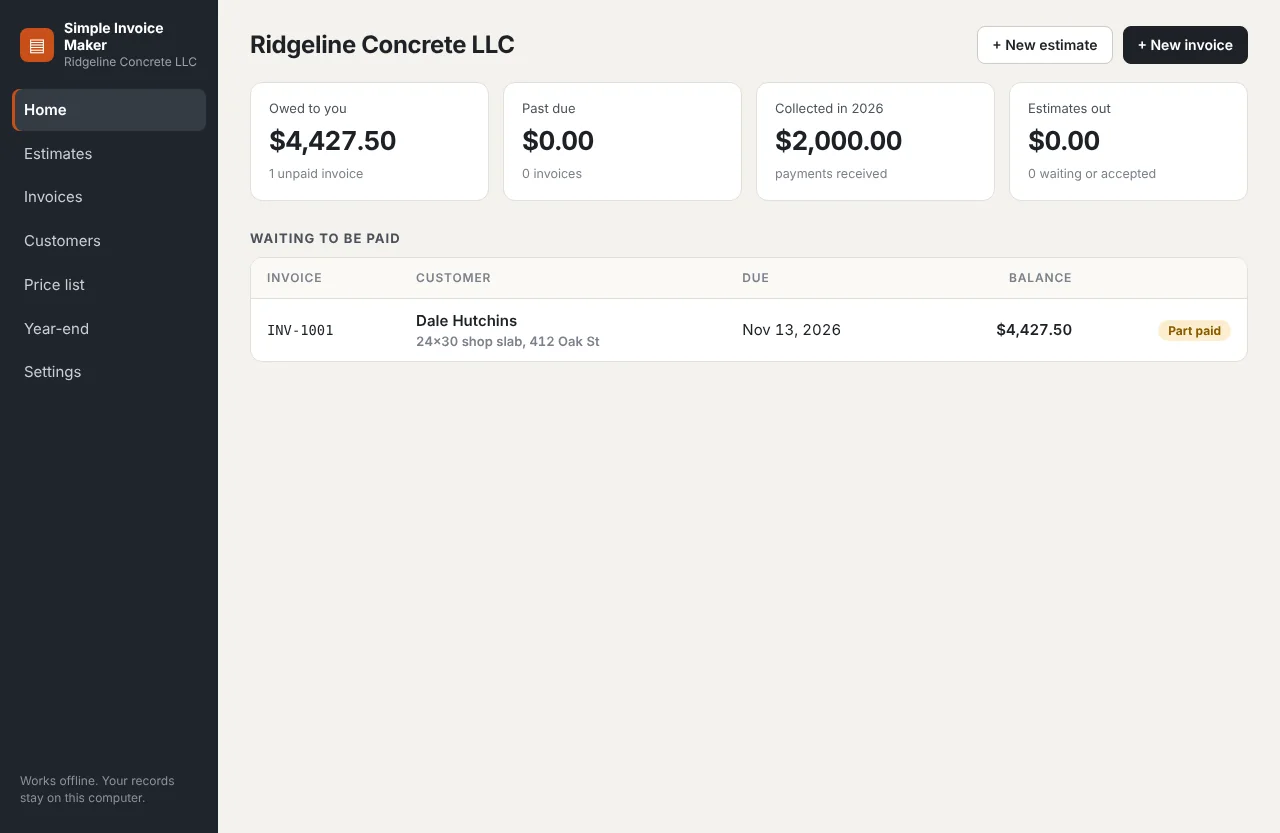
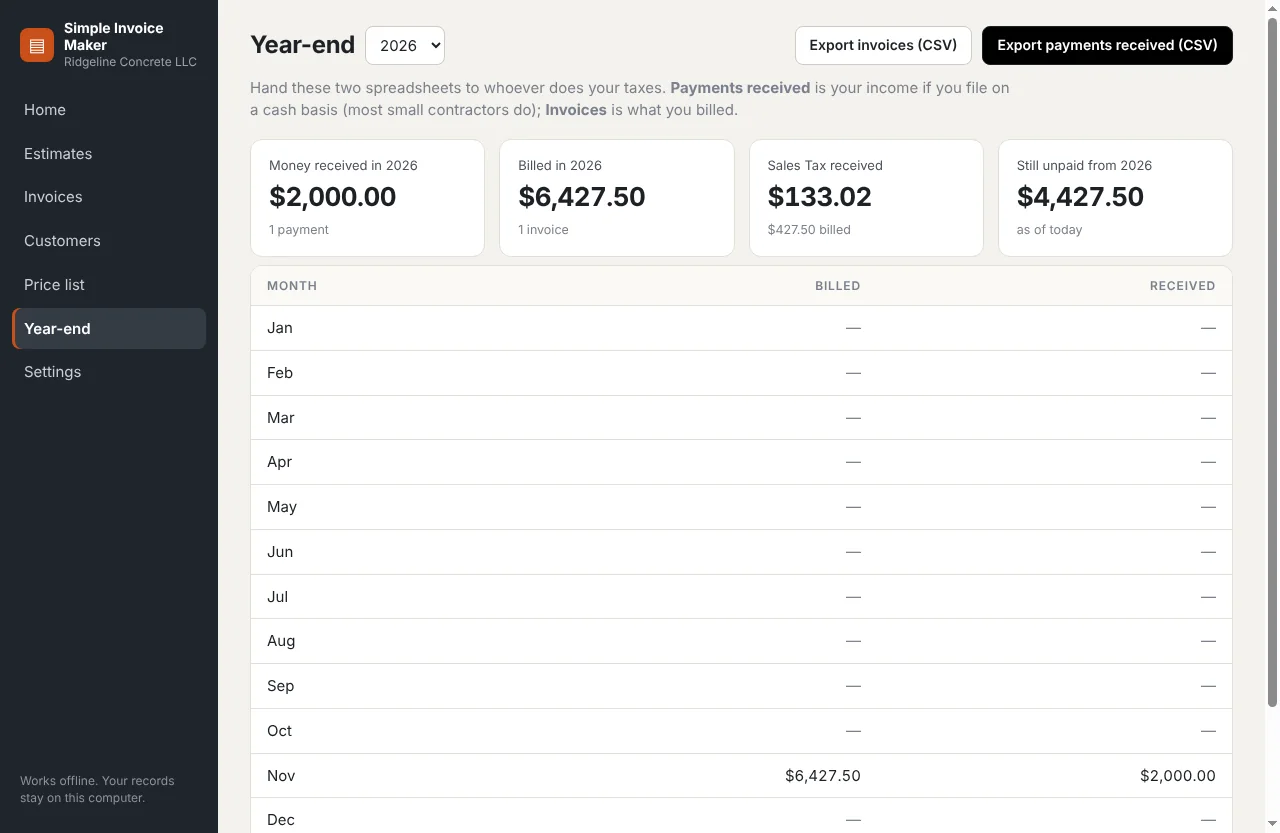
Hand over the year-end spreadsheet
Two CSV files for your tax preparer: what you were paid and what you billed, month by month.
Invoice templates
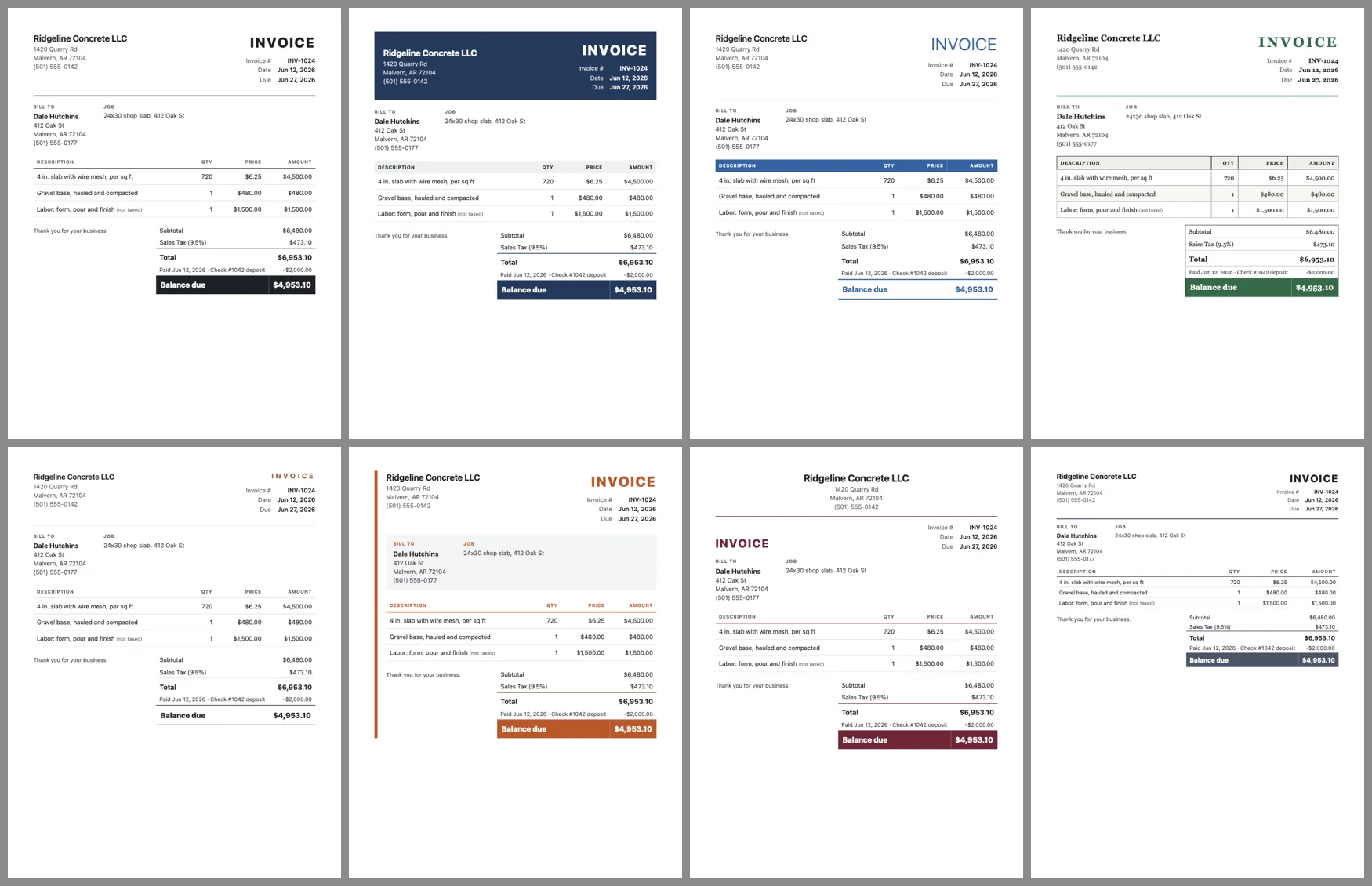
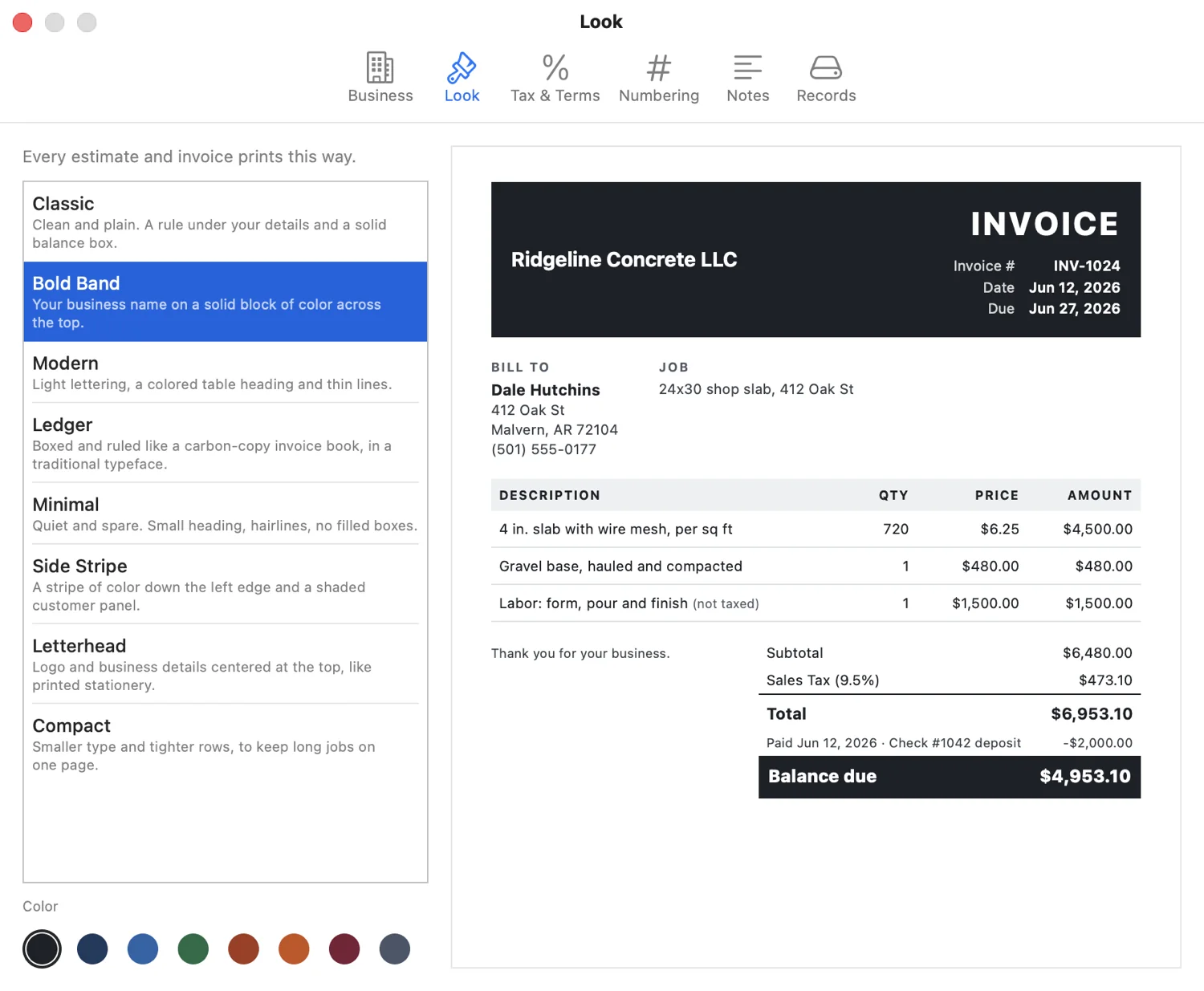
Eight invoice templates, eight colors, your logo on top.
Classic, Bold Band, Modern, Ledger, Minimal, Side Stripe, Letterhead and Compact. Pick one in Settings and every estimate and invoice prints that way, with your business name, address, phone and contractor license number.
Made for trades paperwork
- Estimates print with a signature line for the customer.
- Paid invoices print with a PAID stamp and the payments listed.
- Untaxed lines, such as labor, are marked.
- Compact keeps a long job on one page.
What's in it
Everything a contractor's paperwork needs, and nothing else.
Bring over your QuickBooks lists
Customers and your item list come over from QuickBooks Desktop Excel, CSV or IIF exports, with costs and prices. No retyping.
See what you make on every job
Type your cost on each line. The estimate shows your cost, your profit and the share of the price you keep. Only you see it.
Price from your cost
Set your markup once, like ×2. Type a cost and the price fills in. Never printed on the customer's copy.
Change orders
Write up extra work, get it signed, and it goes onto the final invoice. Home warns you when an approved change has not been billed.
Statements and past-due letters
One click prints everything a customer owes, or a friendly, firm or final past-due letter with the late invoices listed.
Estimates and invoices
Line items with quantity and price, a discount, notes at the bottom, and a signature line on estimates.
One click from estimate to invoice
Customer, job, lines and tax carry over. The estimate is marked as invoiced.
Deposits and part payments
Every payment is recorded against the invoice with its date, method and check number.
Knows who owes you
Unpaid, part paid, past due and paid are worked out for you, with what each customer owes by how late it is.
Sales tax by the line
Tax materials and not labor, or the other way round. One rate in settings, changeable on any document.
Price list
Save what you charge for again and again and pick it instead of retyping.
Customers
Names, phone, address and private notes, with what each customer owes you.
Your numbering
Set the prefix and the next number so invoices carry on from your old software.
PDF and print
Save a PDF to email or print on your own printer. A paid invoice prints with a PAID stamp.
Year-end CSV
Payments received and invoices billed, in files that open in Excel.
Backups you control
A daily automatic copy, plus a backup file you can put on a thumb drive. Windows and Mac backups are interchangeable.
No account, no sign-in
Install it and start. Nothing to register and nothing sent anywhere.
Compare
Simple Invoice Maker for Desktop compared with QuickBooks and spreadsheets.
| Simple Invoice Maker for Desktop | QuickBooks Desktop | QuickBooks Online | Word or Excel template | |
|---|---|---|---|---|
| How you pay | $49 once | Yearly subscription | Monthly subscription | Nothing extra |
| Works with no internet | Yes, always | Mostly; online services need a connection | No | Yes |
| Account or sign-in | None | Intuit account | Intuit account | None |
| Estimate becomes an invoice | One click | Yes | Yes | Copy and retype |
| Tracks deposits and who owes you | Yes | Yes | Yes | By hand |
| Payroll, bank feeds, full accounting | No | Yes | Yes | No |
| Where your records live | One file on your computer | Your computer | Intuit's servers | Loose files |
Comparison as of November 2026. QuickBooks is a registered trademark of Intuit Inc. Simple Invoice Maker for Desktop is made by Rivets Software LLC and is not affiliated with or endorsed by Intuit.
It is a good fit if you
- Are a contractor, tradesman or small shop that bills by the job.
- Only need estimates, invoices and a record of payments.
- Want your records on your own computer, not in an online account.
- Are done paying every month for software.
It is not for you if you need
- Payroll or bank account syncing.
- Inventory, purchase orders or bill pay.
- Profit-and-loss or balance sheet reports.
- Several people working in the same records at once.
- Your old QuickBooks invoices and payment history. Only customer and item lists come over.
One price. One time.
- Windows and Mac versions
- No subscription and no account
- Works with no internet
- Brings over your QuickBooks lists
- Shows your profit on every job
- Change orders that roll into the invoice
- Statements and past-due letters
- Eight invoice templates
Questions
Questions contractors ask.
What is Simple Invoice Maker for Desktop?
Simple Invoice Maker for Desktop is estimating and invoicing software for contractors and other trades that runs on a Windows PC or a Mac with no internet connection. It costs $49 once. It brings over your customer and item lists from QuickBooks Desktop, shows what you make on each estimate from your own costs, writes change orders that roll into the final invoice, turns an estimate into an invoice, tracks deposits and payments, prints customer statements and past-due letters, and exports a year-end spreadsheet for your tax preparer.
Is there a monthly or yearly fee?
No. It is a one-time purchase of $49. There is no subscription and no account to keep paying for.
Does it work without the internet?
Yes. The app has no online features at all. You can write an estimate in the truck, in a shop with no signal, or on a computer that is never connected. Your records are one file on your own computer and nothing is uploaded.
Is it a replacement for QuickBooks Desktop?
Only for the estimating and invoicing part. If all you used QuickBooks Desktop for was estimates, invoices and knowing who still owes you, it covers that. It is not accounting software: it has no payroll, bank feeds, bill pay, inventory or profit-and-loss reports. If you need those, you still need an accounting program or a bookkeeper.
Can I bring my customers and price list over from QuickBooks?
Yes. In QuickBooks Desktop, export your Customer List and your Item List to Excel or CSV (or export both as an IIF file), then choose those files in Simple Invoice Maker. It brings over names, phone numbers, emails, billing addresses, item descriptions, prices, your costs and which items are taxed. Running it again never makes duplicates. Old invoices and payment history do not come over; set your next invoice number so your numbering carries on where QuickBooks left off.
Can it show how much I make on a job?
Yes. Type what each line costs you and the estimate shows your total cost, what you make, the share of the price you keep, and your price divided by cost. Set your usual markup once (for example 2 to double your cost) and the price fills in from the cost. Costs and profit are only shown to you: they are never printed, saved to the PDF or exported. A Show My Costs switch hides them when a customer is looking at your screen.
How do I turn an estimate into an invoice?
Open the estimate and click Turn into Invoice. The customer, job, line items, tax and discount carry over, along with any approved change orders. The invoice gets the next invoice number, and the estimate is marked as invoiced.
Does it handle change orders?
Yes. Open the job's estimate or invoice and click New Change Order. List the work being added (or taken out), print it for the customer to sign, and mark it approved. The printed change order shows the original price, any earlier changes, this change and the new job total. Approved change orders go onto the invoice automatically when you turn the estimate into an invoice, or you can add one to an invoice you already sent, or bill it on its own. The home screen warns you about any approved change order that has not been billed yet.
Can it track deposits and partial payments?
Yes. Record each payment with its date, amount, method and check number. The invoice shows the balance due and moves from Unpaid to Part Paid to Paid on its own, and to Past Due once the due date goes by.
Can it print customer statements and past-due letters?
Yes. Who Owes Me lists every customer with an unpaid invoice, how late they are, and what is owed by age: current, 1 to 30, 31 to 60, 61 to 90 and over 90 days late. One click makes a statement of everything a customer owes, or a past-due letter: a friendly reminder, a second notice or a final notice, with a pay-by date and the late invoices listed. Change any of the wording before you print it or save it as a PDF. The app remembers which letter went out last and suggests the next step. Nothing is sent for you; you print, mail or email it yourself, so there is nothing extra to pay.
What do I give my accountant at tax time?
Two spreadsheets (CSV files) for the year, which open in Excel. Payments Received lists every payment by the date you were paid, which is your income if you file on a cash basis. Invoices lists everything you billed, with sales tax shown separately.
Can I charge sales tax on materials but not labor?
Yes. Set your sales tax rate once, then tick or untick tax on each line. Lines that are not taxed are marked on the printed invoice.
What do the invoices look like?
There are eight templates (Classic, Bold Band, Modern, Ledger, Minimal, Side Stripe, Letterhead and Compact) and eight colors. Your logo, business name, address, phone and contractor license number print at the top. Invoices save as PDF or go straight to your printer.
Does it run on both Windows and Mac?
Yes. It runs on Windows 10 and Windows 11 (64-bit), and on macOS 14 or later on both Apple silicon and Intel Macs. The Mac version is a native Mac app. A backup made on one opens on the other.
Where is my data kept, and how is it backed up?
Everything is kept in one file on your computer. The app keeps its own copy from each of the last 30 days you opened it, and you can save a backup to a thumb drive or another folder whenever you like. To move to a new computer, restore that backup.
How do I buy and activate it?
Buy here for $49 USD. After checkout, you receive the license key by email and can activate on one Windows or Mac computer.
System requirements
Windows
- Windows 10 or Windows 11, 64-bit
- No internet connection needed
Mac
- macOS 14 or later
- Apple silicon or Intel
- Native Mac app
On a phone instead? See Simple Invoice Maker for phones. Questions: [email protected].